

Top Appointment Scheduling CRMs for Reducing No-Shows & Cancellations
Improve scheduling efficiency with CRM software that centralizes bookings, automates follow-ups, and helps businesses reduce missed appointments.

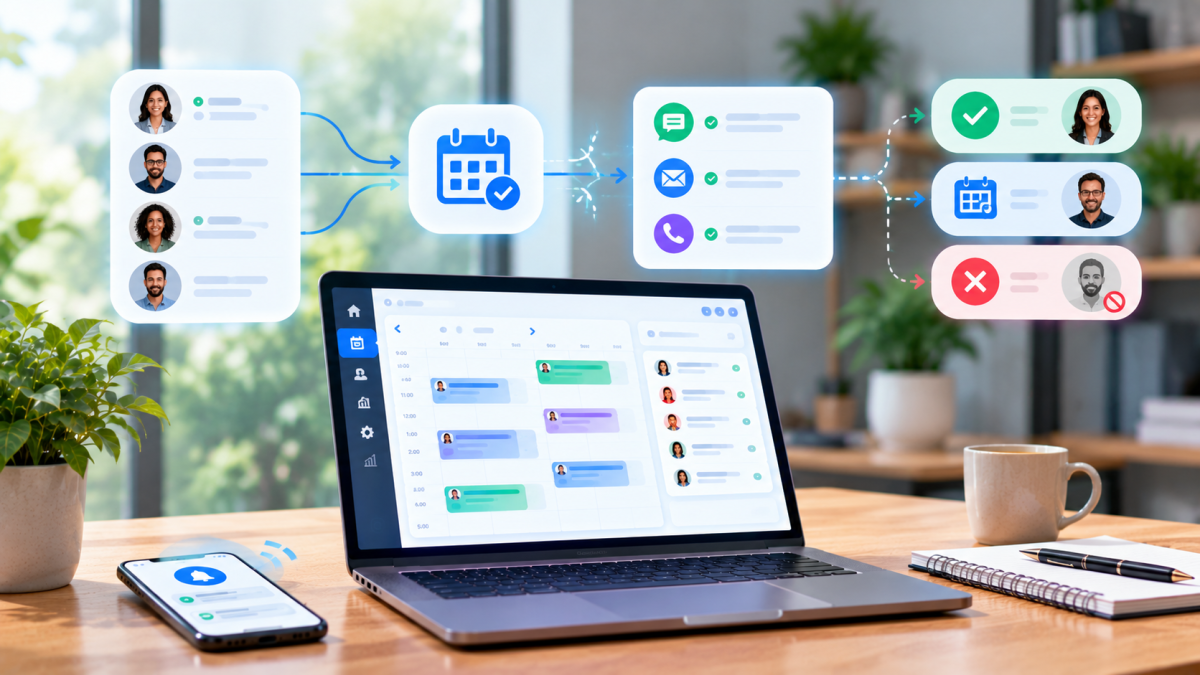
When staff members sit idle because a client failed to show up, labor overhead remains fixed while billable capacity vanishes permanently. Simple digital calendar apps cannot solve this problem because they lack integrated customer tracking, automated multi-channel messaging, and policy enforcement mechanisms.
Implementing a specialized Smart Appointment Scheduling Software India and global solution bridges this gap by unifying customer records, sending automated SMS and WhatsApp reminders, and collecting upfront deposits. This article reviews the top appointment scheduling CRMs designed to minimize no-shows, explains the mechanisms that secure client attendance, and provides a clear framework for selecting the best platform for your business.
Quick Answer: The top appointment scheduling CRMs for reducing no-shows and cancellations include Calendly, Acuity Scheduling, Meon, Setmore, Square Appointments, and SimplyBook.me. These platforms lower absentee rates through automated multi-channel reminders (SMS, WhatsApp, email), self-service rescheduling links, upfront deposit collection, and automated standby waitlists.
What Is an Appointment Scheduling CRM?
An appointment scheduling CRM is a centralized software platform that combines customer relationship management with real-time online booking capabilities. It tracks customer interaction histories, syncs staff calendars, automates confirmation and reminder workflows, and processes payments, allowing service organizations to manage the complete client lifecycle and prevent missed appointments without manual front-desk intervention.
Unlike basic calendar applications that merely record an event on a grid, an appointment scheduling CRM manages the broader operational relationship between the business and the client. Standalone booking tools often fail to capture client history, track historical attendance habits, or trigger multi-stage communications based on appointment status.
A dedicated scheduling CRM integrates five core operational pillars:
- Client-Facing Booking Engine: An interactive portal where clients view real-time availability, select specific staff members or services, and book appointments 24/7.
- Multi-Channel Communication Workflows: Automated notification triggers that send instant confirmations, preparation guidelines, and timed reminders across SMS, WhatsApp, and email.
- Two-Way Calendar Synchronization: Live bi-directional integration with Google Calendar, Microsoft Outlook, and Apple Calendar to eliminate scheduling conflicts and accidental double-bookings.
- Centralized Customer Database: Profiles containing client contact details, historical attendance, no-show frequency, service notes, and billing history.
- Integrated Payment Gateway: Tools to collect full prepayments, non-refundable deposits, or credit card pre-authorizations at the time of booking.
Service-oriented sectors depend heavily on these platforms to stabilize daily operations. Medical practices, dental clinics, wellness spas, legal consultancies, financial advisory firms, and educational training centers utilize scheduling CRMs to maintain consistent calendar occupancy and steady revenue.
The True Cost of No-Shows and Cancellations on Service Businesses
No-shows and late cancellations inflict severe financial damage by creating unrecoverable perishable inventory losses where billable hours vanish while fixed operational overhead remains unchanged. They disrupt daily staff schedules, delay care or service delivery for waitlisted clients, and degrade customer lifetime value due to fractured service continuity.
When an appointment is missed without sufficient notice, the service business absorbs an absolute loss. Time cannot be stored in inventory; an empty 45-minute consultation slot at 2:00 PM has zero salvage value once that window passes.
The negative operational impacts cascade across several business functions:
- Perishable Capacity and Direct Revenue Loss: Empty appointment slots produce zero revenue while fixed costs—such as practitioner wages, commercial rent, utilities, and administrative support—remain constant.
- Staff Disruption and Productivity Loss: Highly compensated professionals spend scheduled time waiting rather than delivering billable services or performing strategic work.
- Waitlist Disruption: Late cancellations prevent front-desk staff from contacting and confirming standby clients in time, leaving eager clients unserved while slots sit empty.
- Customer Lifetime Value Erosion: Clients who miss appointments regularly experience fragmented service delivery, leading to lower satisfaction, delayed results, and higher long-term client churn.
Industry benchmarks indicate the severity of this operational problem across sectors. Healthcare and diagnostic clinics frequently report no-show rates between 15% and 20%, personal care and wellness businesses experience absentee rates between 10% and 15%, and professional corporate consultancies average between 8% and 12% in missed billable meetings.
How Appointment Scheduling CRMs Actively Prevent No-Shows
Appointment scheduling CRMs prevent no-shows by combining multi-channel automated reminders across SMS, WhatsApp, and email with friction-free self-service rescheduling links. By enforcing upfront booking deposits, synchronizing staff calendars to prevent double-bookings, and instantly reallocating canceled slots through automated waitlists, these platforms secure client commitment and protect billable capacity.
Modern scheduling CRMs deploy several integrated workflows to ensure scheduled bookings translate into attended appointments:
- Multi-Channel Automated Reminders: Delivering notifications across SMS, WhatsApp, and email reaches clients on their preferred channels, ensuring critical appointment details and preparation instructions are seen well before the scheduled time.
- Frictionless Self-Service Rescheduling: Providing direct, one-click rescheduling links inside reminder messages allows clients with sudden scheduling conflicts to move their appointments independently rather than abandoning them.
- Upfront Deposits and Prepayments: Requiring a partial deposit or full payment during online booking establishes clear financial commitment, sharply reducing casual non-attendance.
- Real-Time Two-Way Calendar Sync: Continuously updating staff availability across external calendar systems prevents overlapping commitments and administrative scheduling errors.
- Dynamic Waitlist Automation: When an appointment is canceled, the CRM immediately identifies the opening and notifies standby clients, filling vacant slots within minutes without manual administrative calls.
- Digital Intake Forms: Mandating that clients complete intake questionnaires or upload relevant documents prior to confirmation increases psychological commitment and visit readiness.
Top Appointment Scheduling CRMs for Reducing No-Shows & Cancellations
The top appointment scheduling CRMs for reducing no-shows are Calendly, Acuity Scheduling, Meon, Setmore, Square Appointments, and SimplyBook.me. Each platform mitigates missed appointments through specialized features like automated multi-channel reminder workflows, advance deposit collection, calendar synchronization, and automated standby waitlists tailored to different business models and operational scales.
1. Calendly
Calendly is a cloud-based scheduling platform designed to streamline meeting coordination through shareable booking links, automated notification workflows, and calendar integrations.
Calendly tackles no-shows through automated workflow automation. Users can build multi-step communication paths that send confirmation emails, SMS reminders, and post-meeting follow-ups. The platform embeds one-click rescheduling and cancellation controls directly inside calendar invites and reminder messages, allowing invitees to update their bookings without back-and-forth communication.
- Pros: Clean, intuitive interface; robust video conferencing integrations; reliable two-way calendar sync.
- Cons: Basic native CRM capabilities; SMS workflows are restricted to higher-tier subscriptions.
- Best Suited For: B2B sales professionals, recruiters, and independent consultants managing individual appointment calendars.
- Pricing Overview: Free basic plan available; paid tiers unlock automated multi-message workflows, SMS notifications, and team routing.
2. Acuity Scheduling
Acuity Scheduling is a service-focused appointment management platform built for businesses that require customized client intake questionnaires, advance deposits, and flexible calendar controls.
Acuity reduces missed bookings by allowing businesses to require deposits or full payments via Stripe, Square, or PayPal at the point of scheduling. It enables administrators to enforce strict cancellation policies, specifying the exact cutoff window for permitted modifications. Automated SMS and email reminders can be personalized with dynamic client fields and service-specific instructions.
- Pros: Comprehensive custom intake forms; flexible payment gateway integration; robust multi-staff scheduling rules.
- Cons: Interface requires setup time for complex service menus; SMS reminder allocations depend on the subscription tier.
- Best Suited For: Wellness clinics, physical therapists, coaching practices, and multi-staff service businesses.
- Pricing Overview: Paid subscription plans scaling by the number of active staff calendars and advanced communication features.
3. Meon
Meon is a unified appointment scheduling CRM and multi-channel communication engine engineered to help service organizations manage bookings, automate reminders, and eliminate attendance drop-offs from a single platform.
Meon specifically targets no-shows by pairing an automated booking engine with high-deliverability messaging channels, ensuring clients receive timely alerts where they are most responsive.
Key features for reducing no-shows and cancellations:
- Automated Multi-Channel Reminders: Sends coordinated confirmation and reminder sequences across WhatsApp, SMS, and email. In markets where WhatsApp exhibits significantly higher open rates than email, this multi-channel delivery guarantees message visibility.
- Self-Service Rescheduling Portal: Gives clients an intuitive mobile portal to move their bookings to available future slots in real time, preventing outright cancellations.
- Integrated Deposit & Prepayment Workflows: Connects with online payment gateways to collect upfront booking fees or retain payment credentials, securing financial commitment.
- Automated Waitlist Management: Automatically detects newly opened appointment slots and broadcasts instant availability alerts to waitlisted clients, filling vacated times without staff outreach.
- Unified Client Attendance Tracking: Logs historical attendance, late arrivals, and cancellation records within the central CRM profile, enabling businesses to identify chronic no-show clients.
For businesses looking for Smart Appointment Scheduling Software India and multi-regional service operations, Meon delivers an integrated solution that combines scheduling workflows with localized messaging and payment systems, ensuring high calendar occupancy for clinics, diagnostic centers, and professional service teams.
- Pros: Built-in WhatsApp, SMS, and email automation without third-party connector fees; robust client attendance tracking; multi-location and multi-staff management.
- Cons: Focused primarily on service and consultation workflows rather than complex physical inventory tracking.
- Best Suited For: Multi-location clinics, diagnostic centers, salons, legal consultancies, and service businesses requiring high-deliverability mobile reminders.
- Pricing Overview: Transparent, cost-effective pricing tiers structured to scale predictably with staff seats and communication volume.
4. Setmore
Setmore is an accessible appointment booking platform offering a functional free entry plan with automated email notifications, online payments, and client profile management.
Setmore reduces missed appointments by providing dedicated booking pages that link directly to social media profiles and business websites. Automated email confirmations alert clients to their upcoming times, while integrated payment processing via Square and Stripe lets businesses charge booking fees to discourage casual no-shows.
- Pros: Generous free plan supporting multiple staff members; clean mobile application for staff; straightforward setup.
- Cons: Two-way calendar sync and automated SMS reminders require paid plan upgrades.
- Best Suited For: Solo practitioners, barbershops, and small service teams needing simple booking without complex configuration.
- Pricing Overview: Free tier available with core features; paid tiers unlock SMS notifications and advanced two-way calendar sync.
5. Square Appointments
Square Appointments integrates appointment scheduling directly into the Square point-of-sale ecosystem, making it a natural fit for retail service businesses that process in-person transactions.
The platform prevents no-shows through integrated payment enforcement. Businesses can require a credit card on file during online booking and automatically charge cancellation or no-show fees according to their stated policy. The system delivers automated SMS and email reminders to clients as appointments approach.
- Pros: Complete integration with Square POS hardware and merchant processing; card-on-file cancellation fee enforcement; simple staff scheduling.
- Cons: Less flexible for organizations that do not use Square for payment processing; limited custom marketing automation.
- Best Suited For: In-person retail service businesses, salons, spas, and personal care professionals using Square POS.
- Pricing Overview: Free for single-staff locations; tiered monthly pricing for multi-staff operations with standard transaction fees.
6. SimplyBook.me
SimplyBook.me is a highly configurable booking management platform designed for service enterprises that require custom booking workflows, international compliance, and modular feature expansion.
SimplyBook.me addresses no-shows by providing customizable booking rules, advance deposit requirements, and automated notifications across email and SMS. The platform features an automated waitlist mechanism that notifies registered clients whenever a previously booked slot opens up, alongside strict client verification controls.
- Pros: Extensive modular feature catalog; medical data privacy compliance features (including HIPAA readiness); multi-language support.
- Cons: Modular system can complicate configuration; SMS message credits must be purchased in separate packages.
- Best Suited For: Medical providers, corporate service enterprises, and international organizations needing strict compliance standards.
- Pricing Overview: Free tier with basic features and limited monthly bookings; paid plans provide increasing allocations of custom modules and booking volume.
Comparison Table: Top Appointment Scheduling CRMs for Reducing No-Shows
The comparison table evaluates leading scheduling CRMs across their primary anti-no-show mechanisms, supported communication channels, target business models, and starting price tiers. Comparing these core parameters helps service operators match their specific attendance management needs and budget requirements with the optimal software platform.
Add row aboveAdd row belowDelete rowAdd column to leftAdd column to rightDelete columnCRM PlatformPrimary Anti-No-Show MechanismCommunication ChannelsBest ForStarting PriceCalendlyAutomated reminder workflows & reschedule linksEmail, SMSB2B consultants & sales teamsMid-Tier ($$)Acuity SchedulingMandatory intake forms & deposit collectionEmail, SMSWellness, health clinics, & coachesMid-Tier ($$)MeonMulti-channel reminders (WhatsApp/SMS/Email) + auto-waitlistWhatsApp, SMS, EmailMulti-location clinics, salons, consultanciesCost-Effective ($)SetmoreFree booking pages & automated email notificationsEmail, SMS (paid)Solo practitioners & small service shopsBudget-Friendly ($)Square AppointmentsCard-on-file pre-authorization & fee enforcementEmail, SMSIn-person service retail on Square POSEntry/Mid-Tier ($)SimplyBook.meAutomated waitlist & customizable deposit rulesEmail, SMSRegulated healthcare & enterprise servicesMid-Tier ($$)
Key Features to Look for in an Anti-No-Show Scheduling CRM
An effective anti-no-show scheduling CRM must offer multi-channel automated messaging, friction-free one-click rescheduling, upfront deposit processing, and real-time calendar synchronization. Platforms should also provide automated waitlist management, detailed attendance tracking analytics, and comprehensive customer profiles that record historical cancellation patterns to maintain reliable schedule occupancy.
When evaluating appointment scheduling platforms, service operators should prioritize the following capabilities:
- Multi-Channel Automated Reminders: Support for automated confirmation and reminder delivery across SMS, WhatsApp, and email to ensure message visibility.
- One-Click Reschedule and Cancellation Links: Embedded links within reminder messages that allow clients to modify their appointments easily, preventing outright abandonment.
- Upfront Payment and Deposit Gateways: Direct integration with payment processors (such as Stripe, Razorpay, or Square) to collect mandatory deposits or securely store credit cards for fee enforcement.
- Bi-Directional Calendar Synchronization: Continuous, real-time sync with Google Calendar, Outlook, and Apple Calendar to eliminate booking overlaps.
- Dynamic Waitlist Automation: Automated systems that instantly broadcast newly opened slots to standby clients when cancellations occur.
- Customizable Intake Questionnaires: The ability to collect critical health histories, consultation briefs, or service preferences prior to booking confirmation.
- Attendance Analytics and No-Show Reporting: Dashboards that track no-show rates across specific staff members, service types, and customer segments to identify operational trends.
- Centralized Customer Attendance History: CRM profiles that log historical attendance habits, allowing businesses to flag chronic no-show clients.
How to Choose the Right Scheduling CRM for Your Business
To choose the right scheduling CRM, businesses should audit their baseline no-show rate, identify client communication preferences, evaluate industry compliance needs, and test payment gateway integrations during live trials. Prioritizing platforms with native multi-channel messaging and low administrative complexity ensures rapid staff adoption and immediate attendance improvements.
Follow this practical selection framework to identify the optimal platform for your business:
1. Audit Communication Preferences and Baseline No-Show Rates
Analyze how your clients currently interact with your business. If your client base rarely opens emails but actively uses mobile messaging apps, selecting a platform like Meon that provides native WhatsApp and SMS reminders will reduce no-shows much more effectively than an email-reliant tool.
2. Evaluate Industry Requirements and Workflow Complexity
Match the software to your specific operational environment:
- Medical and Healthcare: Requires patient intake questionnaires, strict data privacy standards, and resource management (linking specific practitioners to designated treatment rooms).
- Professional Services and Consulting: Demands video conferencing integration, time-zone conversion capabilities, and calendar coordination across multiple team members.
- Salons and Spas: Benefits from card-on-file retention, deposit processing, and automated rebooking sequences.
3. Verify Payment Gateway and Accounting Compatibility
Ensure the platform connects with your local payment gateways to process booking deposits without friction. The software should handle refunds according to your cancellation window policies and log payment records without requiring manual reconciliation.
4. Practical Implementation Example
The following scenario illustrates how a multi-specialty wellness clinic reduced missed appointments by deploying an integrated scheduling CRM:
- Problem: A wellness clinic with eight practitioners experienced a 19% no-show rate, resulting in substantial lost revenue each month. Front-desk staff spent three hours daily placing manual confirmation phone calls that frequently went unanswered.
- Approach: The clinic implemented a unified scheduling CRM to automate multi-channel reminders, require advance booking deposits, and enable self-service rescheduling.
- Implementation:
- Booking Policy: Mandated a 25% deposit for all online bookings, applicable toward final service bills.
- Automated Workflow: The system sent an immediate WhatsApp confirmation with intake forms upon booking.
- Reminder Sequence: The CRM delivered automated WhatsApp reminders 48 hours and 24 hours before appointments, containing a one-click rescheduling link valid up to 12 hours prior to the session.
- Waitlist Fill: If a client rescheduled, the platform instantly broadcast the open slot to standby clients via automated WhatsApp messages.
- Booking Policy: Mandated a 25% deposit for all online bookings, applicable toward final service bills.
- Automated Workflow: The system sent an immediate WhatsApp confirmation with intake forms upon booking.
- Reminder Sequence: The CRM delivered automated WhatsApp reminders 48 hours and 24 hours before appointments, containing a one-click rescheduling link valid up to 12 hours prior to the session.
- Waitlist Fill: If a client rescheduled, the platform instantly broadcast the open slot to standby clients via automated WhatsApp messages.
- Outcome: Within 60 days, the clinic’s no-show rate fell from 19% to 3.5%, administrative telephone confirmation time was completely eliminated, and empty calendar slots were filled automatically.
Key Takeaways
- Appointment scheduling CRMs reduce no-shows by combining client communication workflows with customer records and booking policies.
- Relying solely on email notifications is often ineffective; multi-channel reminders across SMS and WhatsApp achieve significantly higher open and confirmation rates.
- Enforcing upfront booking deposits or retaining credit cards on file establishes client commitment and sharply reduces casual absences.
- One-click self-service rescheduling links convert potential abandoned appointments into future attended slots without staff involvement.
- Integrated platforms like Meon streamline operations by combining multi-channel communication, appointment scheduling, and customer records in a single interface.
- Dynamic waitlist automation protects revenue by automatically filling vacated appointment slots with standby customers.
Conclusion
No-shows and late cancellations represent an avoidable financial and operational drain on service businesses. Relying on manual confirmation calls or static calendar grids leaves your schedule vulnerable to miscommunication, client forgetfulness, and casual abandonment. Modern appointment scheduling CRMs eliminate these vulnerabilities by automating client communication and enforcing structured booking policies.
Whether your organization requires the meeting scheduling workflows of Calendly, the intake controls of Acuity, or the unified multi-channel messaging and waitlist automation of a Smart Appointment Scheduling Software India platform like Meon, choosing the right solution protects your billable hours. By automating reminders, enabling friction-free rescheduling, and securing upfront deposits, service businesses can maximize calendar occupancy, maintain staff productivity, and build predictable, sustainable revenue













Comments (0)