

UAE E-Invoice Automation Software: From Data Entry to Exchange
Explore how UAE e-invoice automation software handles data validation, invoice exchange and error tracking.

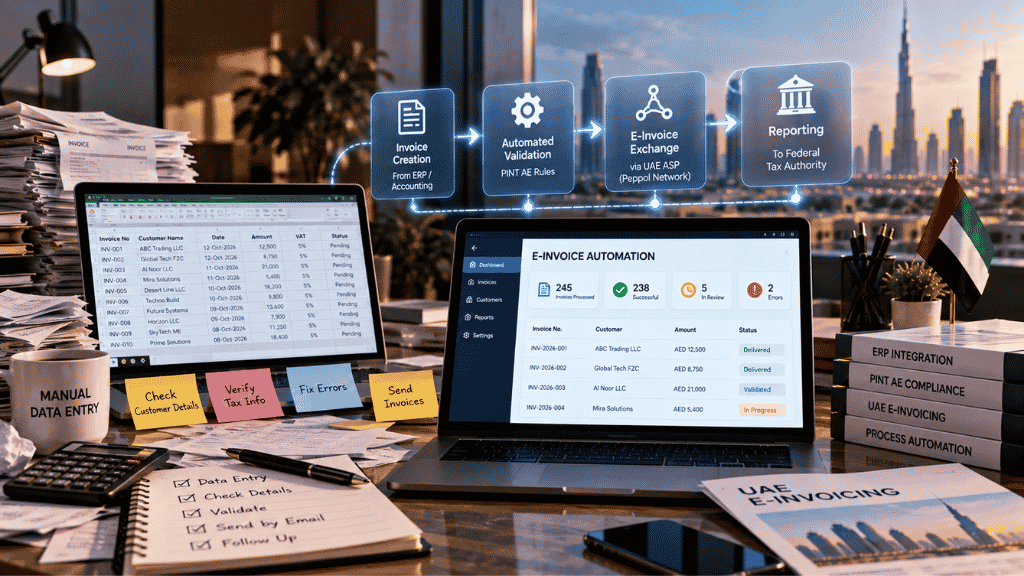
Processing an invoice involves more than entering an amount and sending a document. Someone must check customer details, verify tax information, correct errors and ensure the transaction reaches the right system. When a business handles hundreds or thousands of invoices, these repetitive tasks can place a considerable workload on its finance team.
Automation can change how these tasks are managed. For UAE companies preparing for structured electronic invoicing, e-invoice automation software in the UAE can form part of a workflow that connects invoice creation, data validation and electronic exchange.
Which Parts of Invoice Processing Can Be Automated?
Automation works best when businesses identify repetitive tasks and define the rules that govern them. Under an electronic invoicing workflow, several activities can be handled through connected software systems, depending on their capabilities and configuration.
- Invoice data collection: Information from sales transactions can be transferred from an accounting or ERP system instead of being entered repeatedly by employees.
- Data validation: Software can check whether required fields are present and whether information meets configured validation rules. This helps identify problems before an invoice moves to the next stage.
- Electronic transmission: Once the invoice data is prepared, the system can send it through the applicable service-provider workflow rather than relying on employees to email documents individually.
- Status monitoring: Transaction responses can help employees identify invoices that have been processed successfully or require further attention.
- Exception management: Errors can be directed to the relevant team for review and correction. Automation can identify a problem, but employees may still need to investigate its cause and decide how to resolve it.
The exact level of automation depends on the software, integration arrangements and business processes. Companies should verify specific capabilities rather than assuming every platform automates every task.
How Automation Fits Into UAE E-Invoicing
The UAE's electronic invoicing framework uses structured invoice data and a Peppol-based exchange model. It follows the PINT AE specification for invoice information.
Under the framework, the supplier submits invoice data through its Accredited Service Provider (ASP). The sending provider validates and transmits the information to the buyer's provider, which validates and delivers the invoice to the buyer. The prescribed workflow also includes tax data reporting to the relevant government platform.
This is different from simply generating a PDF and sending it by email. Structured invoice data must be exchanged and processed through the applicable system.
Businesses should therefore examine how their automation software connects to their accounting system and selected ASP. They also need to understand how validation results, transmission failures and invoice corrections are handled.
Companies exploring available options can review Webtel's UAE e-invoicing solution as part of their research. They should confirm the provider's current accreditation, technical capabilities and implementation arrangements before making a decision.
A Practical Example: Reducing Repeated Finance Tasks
Consider a UAE trading company that processes invoices through its ERP. Employees currently check customer information, correct missing fields, send invoices and update an internal spreadsheet to track their status.
After introducing a suitable automated workflow, invoice information may flow directly from the ERP to the connected e-invoicing process. Configured checks can flag missing data, while transaction responses can help employees identify invoices that need attention.
The main operational difference is how staff spend their time. Instead of checking every transaction manually at every stage, employees can focus more on exceptions, data quality and unresolved issues.
Automation does not guarantee that every invoice will be accepted or that payments will arrive faster. Its effectiveness depends on accurate source data, reliable system connections and a clear process for handling errors.
What to Check Before Automating Invoice Workflows
Before implementation, businesses should review the tasks they want to automate and establish how the proposed system will handle them.
| Area | What to examine |
|---|---|
| Source data | Are customer, supplier and tax records accurate and complete? |
| Integration | Can invoice information move reliably from the existing ERP or accounting system? |
| Validation | Which fields and rules are checked before transmission? |
| Error handling | How are rejected invoices identified, corrected and resubmitted? |
| Status tracking | Can employees identify transactions that need attention? |
| Access and security | Who can view or change invoice information? |
| Audit records | Can the business trace relevant actions and transaction responses? |
Businesses should test ordinary transactions as well as common exceptions before relying on the automated workflow. They should also verify that their chosen ASP appears on the UAE Ministry of Finance's official accreditation register.
Preparing for Implementation
Successful automation starts with a clear understanding of the current invoicing process. Finance teams should document where data originates, which checks employees perform and what typically causes delays or corrections.
IT teams can then assess integration requirements and coordinate testing with the selected provider. Both teams should agree on who monitors errors, who approves corrections and how technical issues are escalated.
Businesses must also confirm the implementation schedule applicable to their circumstances. The UAE programme uses phased deadlines based on business category and revenue, so organisations should consult the latest Ministry of Finance guidance before setting their go-live dates.
Preparing data, testing system connections and training employees in advance gives the business a better chance of identifying problems before routine invoice processing depends on the new workflow.
Frequently Asked Questions
What does e-invoice automation software do?
Depending on its capabilities, it can help transfer invoice data, apply validation rules, exchange structured invoices and track processing responses. The precise functions vary by solution.
Can automation eliminate invoice errors?
No. Automated checks can identify certain missing fields or rule violations, but incorrect source data, integration problems and other exceptions can still occur.
Is an ERP required for e-invoice automation?
Not necessarily. The appropriate setup depends on the business's accounting software, invoice volumes and integration requirements.
How can a UAE business verify its service provider?
It should consult the UAE Ministry of Finance's official Accredited Service Providers register and confirm the exact legal entity and current accreditation status.
Making Invoice Automation Work
Automating electronic invoicing is most useful when it addresses specific operational problems rather than simply adding another software layer. Accurate source data, appropriate validation and a clear exception-handling process remain essential.
By identifying repetitive tasks, testing the complete invoice workflow and assigning responsibility for unresolved errors, UAE businesses can prepare for structured electronic invoicing while making better use of their finance team's time.














Comments (0)