

How to Standardize Enterprise Apps Across Hundreds of Android Devices
Learn how to standardize enterprise app deployment across hundreds of Android devices with centralized management, controlled distribution, and phased rollouts.

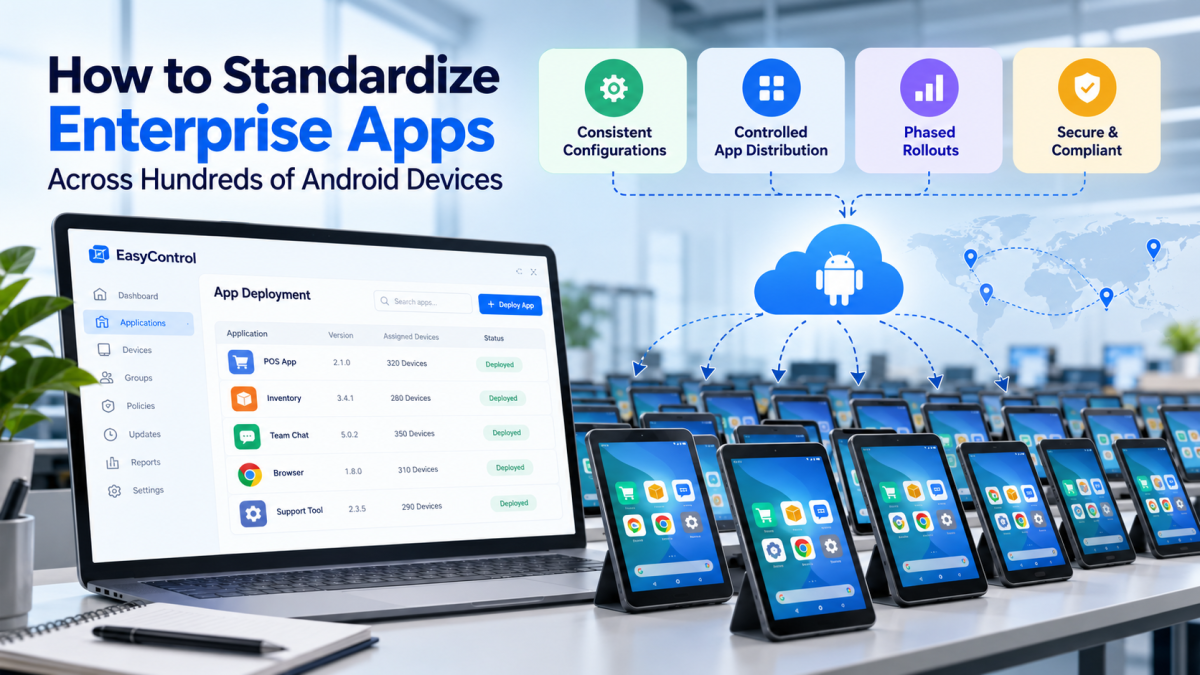
Managing applications on a handful of Android devices is relatively simple. But when a business operates hundreds of smartphones, tablets, point-of-sale (POS) terminals, or dedicated business devices, application management becomes much more complex. Different app versions, inconsistent settings, delayed updates, and manual installation processes can create operational challenges for IT teams.
This is where enterprise app deployment becomes essential. A standardized deployment strategy helps organizations distribute approved applications, maintain consistent configurations, control updates, and reduce the workload associated with managing large device fleets.
With a Unified Device Management solution such as EasyControl UDM, businesses can simplify application deployment and maintain greater control over their Android devices from a centralized platform.
Why Standardizing Enterprise Apps Matters
Enterprise applications support everyday business activities, from processing customer payments to managing inventory, communicating with employees, and accessing internal systems. When applications are not managed consistently, even minor differences between devices can disrupt business operations.
For example, imagine a retail company operating 300 Android POS terminals across 30 stores. If some terminals use outdated payment applications while others have different configurations, troubleshooting becomes more difficult and transaction workflows may become inconsistent.
Standardizing applications helps businesses:
-
Maintain consistent application versions across devices.
-
Reduce errors caused by incorrect configurations.
-
Improve security by controlling which applications can be installed.
-
Simplify troubleshooting and technical support.
-
Reduce repetitive manual work for IT administrators.
-
Ensure employees have access to the tools they need.
A structured approach to Android enterprise application management creates a more predictable, secure, and scalable environment.
1. Create a Centralized Application Management Strategy
The first step toward standardization is establishing a centralized approach to enterprise application management. Instead of allowing individual teams or locations to install applications independently, organizations should define which applications are approved for specific business functions.
Start by creating an application inventory that includes:
-
Application names and package identifiers.
-
Approved versions and update requirements.
-
Business departments or device groups that need each app.
-
Required permissions and configuration settings.
-
Application owners and support contacts.
For example, retail employees may require inventory and communication apps, while POS devices need payment processing and transaction applications. Warehouse tablets may require barcode scanning and stock management software.
Organizing applications by role makes deployment more efficient and prevents unnecessary software from being installed on devices.
How EasyControl UDM helps: A centralized device management platform can support controlled application distribution across managed devices, helping IT teams maintain a more consistent application environment.
2. Group Android Devices by Business Function
Deploying the same applications to every Android device is not always practical. Different teams have different responsibilities, and each device should receive the software required for its intended purpose.
Create logical device groups based on business needs, such as:
-
Retail devices: Inventory, sales, and customer service applications.
-
POS terminals: Payment processing and transaction management apps.
-
Warehouse tablets: Barcode scanning and stock tracking applications.
-
Field service devices: Work order, navigation, and reporting tools.
-
Corporate smartphones: Email, collaboration, and productivity applications.
Once these groups are defined, administrators can assign the appropriate applications and configurations to each group.
For example, a restaurant chain may deploy ordering and payment applications to its POS terminals while installing inventory management software on warehouse tablets. When new devices are enrolled, administrators can apply the relevant deployment rules instead of configuring every device individually.
This approach makes enterprise app deployment easier to scale as the organization adds new employees, devices, or business locations.
3. Standardize Application Configurations
Installing the correct application is only part of the process. Businesses must also ensure that applications use consistent settings across their managed devices.
Configuration differences can lead to inconsistent workflows, unnecessary support requests, and security issues. IT administrators should identify the settings that must remain uniform across the device fleet.
Depending on the application and management capabilities available, these settings may include:
-
Server addresses and environment settings.
-
Authentication and access requirements.
-
Application-specific restrictions.
-
Network and connectivity preferences.
-
Business account or tenant configurations.
-
Permissions and approved usage policies.
Consider a company operating Android tablets across multiple retail locations. Each tablet must connect to the correct business application environment and follow the same operational policies. Applying standardized configurations helps reduce setup errors and makes replacement devices easier to provision.
Where supported, managed application configurations can distribute approved settings without requiring employees to configure each application manually.
With EasyControl UDM, businesses can complement application management with centralized device administration, helping maintain consistent configurations across their managed Android fleet.
4. Implement Controlled Application Distribution
Uncontrolled application installation can introduce security risks, compatibility issues, and unnecessary software into an enterprise environment.
Organizations should establish clear rules about which applications can be installed and how they are distributed. Depending on their operational requirements, businesses can use approved enterprise app stores, managed application catalogs, or centralized deployment tools.
A controlled distribution strategy should include:
-
Application approval: Verify that software meets business and security requirements.
-
Version validation: Confirm that the application works with the organization's devices and systems.
-
Targeted distribution: Assign applications only to the appropriate device groups.
-
Installation monitoring: Track deployment status and identify installation failures where supported.
-
Access control: Restrict unauthorized installation or usage through appropriate device policies.
For dedicated business devices, organizations may also use kiosk mode or application restrictions to limit access to approved applications.
For instance, a self-service kiosk should run the applications necessary for its intended function rather than allowing unrestricted access to unrelated software.
EasyControl UDM can support this broader strategy through centralized device and application management, helping businesses maintain greater control over their Android endpoints.
5. Use Phased Rollouts Instead of Updating Every Device at Once
Rolling out a new application version to hundreds of devices simultaneously can create unnecessary risk. If the update contains a bug or compatibility issue, a large portion of the business may be affected before IT teams can respond.
A phased rollout provides a more controlled alternative.
A practical deployment process can follow these stages:
Stage 1: Test deployment
Install the application on a small group of test devices. Verify functionality, permissions, compatibility, and performance.
Stage 2: Pilot rollout
Deploy to a limited number of users or one business location. Collect feedback and monitor for unexpected issues.
Stage 3: Broader deployment
Expand deployment to additional device groups after the pilot meets predefined acceptance criteria.
Stage 4: Monitor and improve
Review deployment status, application behavior, and support issues. Pause or adjust the rollout if problems emerge.
A phased rollout is particularly valuable for payment terminals, warehouse systems, and other devices that support critical business operations.
Where supported, centralized management tools can help administrators schedule deployments, target device groups, and monitor rollout progress.
6. Automate Application Updates and Maintenance
Manually updating hundreds of Android devices takes time and increases the likelihood that some devices will be missed. Automated or centrally coordinated updates help reduce these problems.
Establish an update policy that defines when applications should be updated, how updates are tested, and how urgent security fixes are prioritized.
Effective application maintenance includes:
-
Reviewing application updates regularly.
-
Testing important releases before broad deployment.
-
Scheduling updates during suitable maintenance windows.
-
Tracking outdated or noncompliant devices.
-
Keeping records of application versions and deployment outcomes.
-
Preparing recovery procedures for failed updates.
For businesses operating across multiple time zones or locations, scheduling can help minimize disruption to daily activities.
EasyControl UDM can complement these processes by helping IT teams centrally manage applications and devices. The precise scheduling, monitoring, and rollout capabilities available will depend on the platform configuration and supported features.
7. Monitor Deployment Status and Resolve Issues Quickly
Even a well-planned deployment can encounter problems. Devices may be offline, storage may be insufficient, network connections may be unreliable, or applications may not be compatible with a particular Android version.
IT teams should establish a process for identifying and resolving these issues.
Monitor key indicators such as:
-
Successful and failed installations.
-
Application version differences across device groups.
-
Device connectivity and compliance status.
-
Application crashes or reported performance issues.
-
Devices that have not received required updates.
When a deployment fails, administrators should investigate the cause before attempting another installation. Maintaining clear deployment records also makes troubleshooting easier and helps prevent the same problems from recurring.
A centralized management approach can reduce the need to inspect each device manually and help IT teams prioritize issues affecting business-critical applications.
8. Establish Clear Security and Compliance Policies
Application standardization should support security as well as operational consistency. Outdated software, excessive permissions, and unauthorized applications can increase organizational risk.
Businesses should establish policies for application approval, access permissions, security updates, and the removal of applications that are no longer required.
They should also consider Android OS compatibility, device security requirements, and relevant data protection obligations.
For organizations with hundreds of endpoints, EasyControl UDM can complement enterprise application deployment by supporting centralized device management and consistent policy administration. Combining application controls with device-level security policies helps organizations build a more manageable environment.
Conclusion
Standardizing enterprise applications across hundreds of Android devices requires more than installing the same software everywhere. Businesses need a structured strategy that includes centralized management, device grouping, consistent configurations, controlled application distribution, phased rollouts, and ongoing monitoring.
These practices help IT teams reduce manual work, improve operational consistency, and manage application changes with greater confidence.
EasyControl UDM can support this strategy by helping organizations centrally manage their Android devices and application distribution processes. Whether a business operates retail tablets, POS terminals, warehouse scanners, or corporate smartphones, a well-planned enterprise app deployment strategy provides a foundation for secure and scalable device management.

EasyControl MDM offers a powerful, intuitive Mobile Device Management solution for managing Android and iOS devices. It supports smartphones, tablets, and digital signage, enabling businesses to securely monitor, configure, and control devices from a centralized dashboard. With advanced security, remote management, and scalability, EasyControl helps enterprises streamline device operations efficiently. https://www.easycontrol.io/blog/mobile-device-management-for-education













Comments (0)