

How Integrated Business Software Can Improve Efficiency and Streamline Business Operations
Integrated business software connects essential business functions such as CRM, HRMS, ERP, task management, automation, and analytics. Learn how integrated systems can reduce manual work, improve collaboration, centralize data, and streamline business operations.

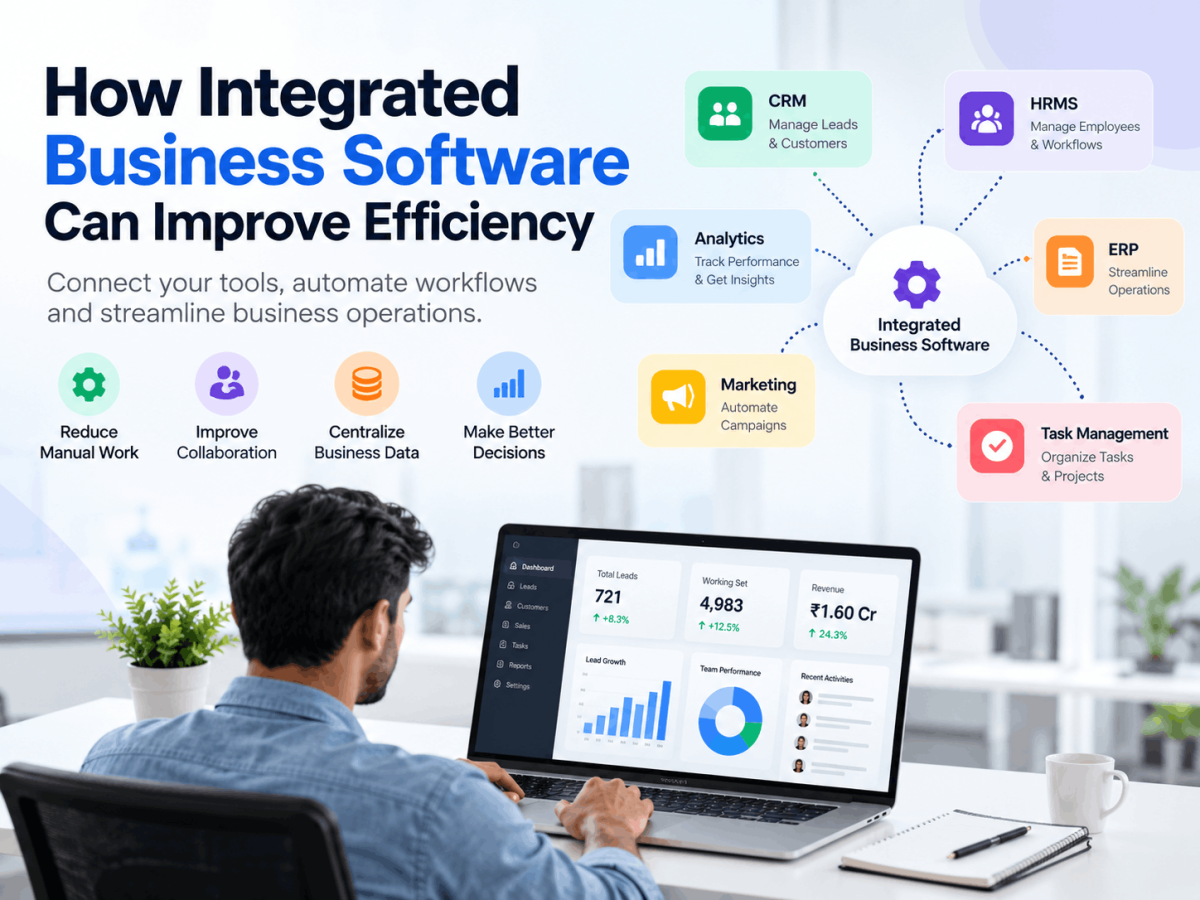
Businesses often invest in separate tools for sales, finance, human resources, marketing, project management, and reporting. Each tool may perform its intended function well, but problems arise when these systems cannot share information. Employees may copy data between platforms, departments may work from different versions of the same record, and managers may wait for reports assembled manually.
Integrated business software helps solve this problem by connecting important business functions through shared data and coordinated workflows. Instead of treating CRM, HR, finance, operations, and reporting systems as isolated applications, businesses can link them to create a more consistent way of working.
The result is not simply a larger technology environment. When planned properly, business process integration can reduce administrative effort, improve collaboration, strengthen visibility, and support better decisions.
What Is Integrated Business Software?
Integrated business software refers to applications that work together by sharing data, triggering workflows, or providing access to connected business processes. Some organizations use one broad platform with several modules, while others connect specialist applications through integrations or APIs.
For example, a sales order recorded in
could be shared with finance for invoicing, operations for fulfilment, and management for reporting. An employee joining the company could trigger an HR workflow that notifies IT, creates onboarding tasks, and alerts the relevant manager.
The purpose is to reduce unnecessary handoffs and ensure that authorized employees can access consistent information. Integration does not mean that every department must use exactly the same software. It means that the systems communicate in a controlled and useful way.
Common Business Systems That Can Be Integrated
CRM Software
CRM software manages customer and prospect information, sales opportunities, communication history, follow-ups, and service activity. When connected with finance or operations, a CRM can provide a wider view of the customer journey.
For example, sales employees can see whether an order has been processed, while customer service staff can review previous communication and purchase information.
HRMS Software
An HRMS supports employee records, attendance, leave, recruitment, onboarding, training, and other human resource activities. Integration with task management, payroll, finance, or access-control systems can reduce repeated administrative work.
When a new employee is added, the HRMS could create onboarding tasks, notify the IT team, and provide the manager with a checklist.
ERP Software
ERP software connects core functions such as finance, procurement, inventory, production, order management, and operations. It gives organizations a broader view of resources and transactions.
An ERP can be integrated with a CRM so that sales teams can view product availability, pricing, delivery status, or order history without requesting information from several departments.
Task Management Platforms
Task management systems help teams assign work, set deadlines, track progress, and identify delays. Connected task management allows activities to be created automatically from events in other systems.
A customer complaint might generate a support task. An approved project might create tasks for operations, finance, and the delivery team.
Accounting and Finance Systems
Accounting platforms manage invoices, payments, expenses, budgets, and financial records. Connecting finance systems with CRM, ERP, HRMS, or e-commerce platforms can reduce duplicate entry and make financial information available at the right stage of a process.
Marketing Platforms
Marketing tools can manage campaigns, email communication, forms, audience segments, and engagement activity. Integration with CRM software allows marketing teams to share lead information with sales and track what happens after an enquiry is received.
Reporting and Analytics Tools
Analytics platforms bring data from different systems into dashboards and reports. This allows managers to review business performance without manually collecting information from separate departments.
How Integration Reduces Manual Work
One of the most visible advantages of integrated software solutions is the reduction of repetitive administrative work.
Reducing Duplicate Data Entry
When the same information is entered into multiple systems, employees spend time repeating work and checking whether records match. Integration can allow information to be entered once and shared with authorized applications.
For example, when a customer updates an address in the CRM, the approved information could be made available to billing and delivery systems. This reduces the need for different employees to update the same record independently.
Limiting Manual Data Transfers
Disconnected teams often exchange information through spreadsheets, email attachments, or informal messages. These methods can create delays and make it difficult to confirm which version is current.
Integrated systems can transfer information according to defined rules. A confirmed purchase order could be sent to procurement and finance automatically, while the operations team receives the relevant fulfilment details.
Reducing Repetitive Administrative Tasks
Notifications, reminders, approvals, recurring reports, and status updates can often be handled through workflow automation. Employees still supervise the process, but they do not need to initiate every routine action manually.
Reducing Information Silos
Information silos occur when data remains trapped in one department or application. Integration makes relevant information available across teams while maintaining access controls.
A marketing team can see whether leads are being followed up. Sales can review customer service activity. Managers can compare operational activity with financial performance.
Limiting Errors from Disconnected Systems
Manual copying can lead to incorrect quantities, outdated contact details, missing fields, or misplaced documents. Automation and validation rules can reduce some of these risks, although businesses must still maintain accurate source data and review important transactions.
Improving Collaboration Between Teams
Shared information can improve communication between sales, marketing, HR, operations, finance, and management. Each department can understand how its work affects the next stage of the business process.
Consider a software company receiving a new customer order. Marketing may have generated the original lead, sales may have negotiated the contract, finance may need to issue an invoice, and the implementation team may need to begin onboarding. If these teams use connected systems, each group can see the information required for its responsibility.
This reduces the need for repeated explanations and separate status requests. It also makes ownership clearer. Employees can see who is responsible for the next step and whether an activity is complete.
Integration does not eliminate the need for communication. Instead, it gives employees a reliable foundation for more useful communication.
Centralizing Business Data
Integrated business software can create a more consistent source of operational information. Centralization makes it easier for authorized users to find records, track activities, monitor performance, and prepare reports.
A manager may be able to review:
-
Open sales opportunities.
-
Pending customer requests.
-
Employee onboarding progress.
-
Inventory availability.
-
Outstanding invoices.
-
Project status.
-
Departmental workloads.
-
Revenue and expense activity.
Centralized data is useful only when it is accurate, current, and governed properly. Organizations should define which system owns each type of information, how records are updated, and who is responsible for correcting errors.
Access should also be based on job responsibilities. Employees should not receive unrestricted access simply because systems are connected.
The Role of Automation
Business process automation allows software to perform actions when specific conditions are met. This makes it possible to create consistent workflows across departments.
Examples include:
-
Assigning new leads to sales representatives.
-
Creating follow-up tasks after customer meetings.
-
Sending notifications when approvals are required.
-
Creating onboarding steps when an employee joins.
-
Updating order status across connected systems.
-
Sending customer communication after a service milestone.
-
Generating scheduled management reports.
For example, an online education company could connect its enquiry form, CRM, payment system, and task platform. A new enquiry can create a contact record, assign a counsellor, schedule a follow-up, and update the record when payment is received.
Automation should be designed around a clear process. If responsibilities are unclear or rules are inconsistent, automation can reproduce confusion at a faster pace. Businesses should simplify workflows and define exception handling before implementing them.
Using Analytics for Better Decisions
When business systems are connected, managers can analyze information from more than one department. This supports better operational visibility and more informed planning.
A dashboard could combine sales, customer, finance, and delivery data to show whether revenue growth is creating pressure on fulfilment capacity. An HR and task management report might help managers understand employee workloads and identify delays in onboarding or project delivery.
Useful analytics may include:
-
Sales pipeline movement.
-
Customer acquisition and retention activity.
-
Order and delivery performance.
-
Employee attendance and onboarding progress.
-
Project completion and workload status.
-
Revenue, expenses, and outstanding payments.
Reports should answer specific business questions. A large number of metrics does not necessarily create better decision-making. Managers should focus on information that helps them identify problems, allocate resources, and improve performance.
Challenges of Implementing Integrated Software
Integration can provide meaningful benefits, but it requires planning and investment.
Implementation Costs
Costs may include software subscriptions, configuration, integration work, data migration, training, support, and maintenance. Businesses should assess total ownership costs rather than comparing only the initial price.
Employee Adoption
Employees may hesitate to change familiar processes. Training, practical support, and clear explanations can help people understand how the new system improves their daily work.
Data Migration
Older spreadsheets and databases may contain duplicates, incomplete records, or inconsistent formats. Data should be reviewed and cleaned before migration.
System Compatibility
Not all applications integrate easily. Businesses should check available connectors, APIs, export options, security requirements, and vendor support before committing to a platform.
Security
Connected systems create more movement of business information. Organizations should use appropriate authentication, permissions, monitoring, backups, and data protection policies.
Choosing Scalable Software
A solution should support expected business growth without becoming unnecessarily complex. Decision-makers should consider user numbers, additional departments, new locations, reporting needs, and future integrations.
How Businesses Can Start
A practical business process integration project can begin with the following steps:
-
Identify disconnected systems and departments.
-
Find repetitive workflows that consume employee time.
-
Map how information currently moves through the business.
-
Determine which applications need to exchange data.
-
Prioritize a high-impact, manageable process.
-
Select software that supports integration and future needs.
-
Clean and prepare existing data.
-
Test the workflow with representative examples.
-
Train employees and document responsibilities.
-
Monitor performance and improve the process over time.
A business might begin by connecting CRM and finance systems before expanding to HRMS, task management, or advanced analytics. A phased approach reduces disruption and provides lessons for later projects.
Business Software from Infoz IT Solutions
Infoz IT Solutions is one example of a technology company offering business software and IT solutions for different operational needs. Its product examples include LEMAI CRM for customer and sales activities, Emplai HRMS for employee processes, Education ERP for education-related management, and task management tools for organizing work.
Businesses evaluating such platforms should focus on functional fit, integration capabilities, data security, usability, scalability, and ongoing support rather than selecting software based only on the number of features.
Conclusion
Integrated business software helps organizations connect departments, reduce manual work, and improve the flow of information. CRM software, ERP software, HRMS software, finance platforms, task tools, marketing systems, and analytics applications can work together to support more consistent business operations.
The main benefits come from reducing duplicate data entry, improving collaboration, centralizing information, automating routine workflows, and giving managers clearer operational visibility. Successful adoption depends on careful planning, clean data, employee training, appropriate security, and a phased implementation strategy.
When integration is guided by real business needs, it can become a practical foundation for business efficiency, business productivity, and long-term digital transformation.







Comments (0)