

Medical and Dental Office Cleanouts: Planning Around Equipment and Privacy
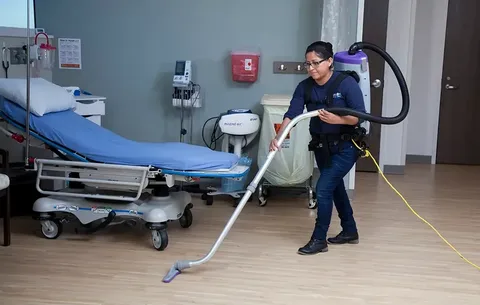
Plan the work in stages: protect patient information, identify equipment risks, and decide what can be reused, recycled, donated, or hauled away before anything moves. The office should also set a work window that limits patient disruption and gives staff time to check each room. Antz Junk Removal may be considered for the nonclinical removal portion after the office confirms its privacy, safety, and disposal requirements. A medical and dental office cleanout should therefore begin with records, devices, and regulated materials not with a pile of furniture by the door.
Key Takeaways
-
Protect patient records and electronic data before moving office contents.
-
Separate ordinary furniture from regulated waste, sharps, chemicals, and pharmaceuticals.
-
Use qualified technicians for attached, heavy, powered, or data-bearing equipment.
-
Confirm building access, timing, loading areas, and disposal responsibilities in advance.
Start With a Written Scope
The first step is a room-by-room inventory. An office manager or assigned lead should list treatment rooms, reception areas, storage closets, laboratories, staff spaces, and utility areas. The list can show what stays, what moves to another location, what may be donated, and what needs a special waste provider.
This prevents a common mistake: treating every unwanted item as ordinary junk. A desk and an empty shelf may be simple to remove, while a medication cabinet, oxygen cylinder, imaging device, or box of old files may require a different process. The inventory also gives the office a clear record of decisions if several staff members are involved.
The schedule matters as much as the list. Work is often easier when no patients are present, especially if movers must pass through treatment areas or use a shared elevator. The office should check building rules, loading times, alarm requirements, floor protection, and any limits set by a landlord or property manager.
Someone should also confirm who owns the equipment. Leased items, rented copiers, phone systems, water treatment units, and service-contract equipment may need to go back to their suppliers. Removing them without checking can create extra charges or leave a new tenant without needed fixtures.
Sort Materials Before Scheduling Removal
The safest approach is to separate materials before a removal date is set. Staff should not place regulated waste, patient records, and ordinary furniture in the same pile. Clear labels and a simple inventory reduce mistakes when several vendors or departments share the work.
-
Patient files, labels, forms, and printed schedules need a privacy review before disposal.
-
Furniture and empty cabinets can usually be assessed for reuse, donation, recycling, or removal.
-
Computers, servers, phones, scanners, and storage drives need data handling before they leave.
-
Sharps, biohazard waste, chemicals, pharmaceuticals, and dental amalgam need the proper waste route.
-
Heavy or attached equipment should be held back until its power, plumbing, gas, and service needs are checked.
A file may still be subject to a retention period, legal hold, insurance matter, or open complaint. Staff should confirm the office policy and applicable rules before authorizing destruction. A vendor’s removal receipt is not a substitute for the office’s own records policy.
Donation is also more involved than putting an item near the door. The office should confirm that equipment works, is safe to use, belongs to the office, and is wanted by the recipient. Cleaning or decontamination may be needed, and the recipient may ask for model details, service records, or proof that stored data has been removed.
Review Equipment Before It Moves
Equipment should be assessed by type and condition before anyone tries to carry it out. A dental chair may be connected to plumbing, air, water, electricity, or a delivery system. An exam table may be heavy and difficult to turn through a narrow doorway. A diagnostic device may contain batteries, fluids, software, or stored patient information.
-
Identify equipment that is fixed to walls, floors, counters, plumbing, or medical gas lines.
-
Have the right technician disconnect powered, pressurized, refrigerated, or imaging equipment.
-
Record serial numbers, ownership details, and service information before items are moved.
-
Measure doorways, hallways, elevators, and loading paths for large or heavy equipment.
When comparing medical office cleanout teams, the office should ask what they will and will not accept. General removal crews may handle desks and empty cabinets but may not take sharps, biohazard waste, pharmaceuticals, or equipment that still contains hazardous substances. The answer should be clear in writing rather than assumed from a broad service label.
X-ray and other imaging equipment deserve extra care. A service professional may need to handle disconnection, data removal, radiation-related parts, or local disposal steps. The same principle applies to compressed-gas cylinders, chemical containers, refrigerators, and equipment with mercury or other special components. If the item’s contents or condition are unclear, it should stay in place until the responsible specialist gives direction.
A practical tip is to photograph complex equipment before disconnection. Photos can show cable locations, wall connections, and the original layout. They can also help the office explain the setup to a technician without relying on memory.
Protect Privacy During the Handoff
Privacy protection must continue from the first room check through the final load. Protected health information, often called PHI, can appear on paper, computer screens, labels, appointment books, imaging systems, voicemail devices, and discarded packaging. A clean-looking room can still contain private details.
-
Keep records in a locked area until the office approves their retention or destruction.
-
Assign one person to oversee computers, drives, phones, and other data-bearing devices.
-
Remove labels and patient names from containers, charts, sample boxes, and equipment when appropriate.
-
Limit access to rooms during the cleanout and keep visitors away from records and screens.
-
Document what was destroyed, transferred, returned, or sent to a specialized provider.
Before booking, managers can ask nearby dental equipment removal teams whether they can keep privacy-sensitive items separate from general loads. They should also ask how workers will enter the building, whether mixed loads are used, and what paperwork the office will receive after the handoff.
Data destruction should match the device. Deleting a file may not remove it from a drive, and a factory reset may not meet the office’s policy for every device. The office’s IT provider or a qualified data destruction service can recommend the right method. Any certificate or written record should be stored with the cleanout documents.
Paper records require the same care. They should not be left beside a public dumpster or placed in an open hallway. If records are transferred to another practice, both sides should agree on the transfer list, timing, storage method, and responsibility for future access.
Timing, Access, and Final Checks
The final plan should name each person responsible for equipment, records, waste, building access, and vendor communication. That simple assignment keeps important questions from being passed from one person to another during a busy move.
The office should protect floors and corners, keep walkways open, and use carts suited to the load. Staff should never lift a heavy chair, cabinet, or device just to keep the schedule on track. If a load shifts, a connection is still live, or an unknown container appears, the work should stop until the item is identified.
Another useful tip is to complete a final sweep after every room is cleared. Check drawers, locked cabinets, wall shelves, refrigerators, storage bins, and computer screens. The person in charge can then compare the space with the original inventory and confirm that no record, medication, device, or personal item was left behind.
Frequently Asked Questions
What Should Happen to Paper Patient Records?
The office should first check its retention policy, legal holds, and any transfer duties. Records approved for destruction should go through a controlled process that prevents public access, with destruction documentation kept for the office files.
Can Old Medical Equipment Be Donated?
It may be donated if it is safe, owned by the office, accepted by the recipient, and prepared properly. The office should provide accurate condition details and remove patient data before transfer.
Who Handles Sharps and Biohazard Waste?
A provider that is authorized for the applicable regulated waste should handle those materials. Ordinary removal crews should not be asked to collect exposed sharps, contaminated supplies, or unknown clinical containers.
How Should Computers and Imaging Devices Be Prepared?
The office should involve its IT provider and, when needed, an equipment service technician. They can address stored data, account access, disconnection, software licenses, batteries, and any special disposal requirements.
Can a Cleanout Happen While Patients Are Being Seen?
Small, low-risk tasks may be possible, but major removal is usually easier when treatment areas are closed. The office should consider noise, dust, privacy, trip hazards, elevator use, and emergency access before choosing daytime work.
What Should an Office Ask About Disposal Documents?
They should ask which items will be reused, recycled, destroyed, returned, or sent to a specialized provider. They can also confirm what receipts, transfer records, or destruction documents will be supplied after each part of the job.
Plan the Handoff Before the Haul
A safe office cleanout is less about speed than control. The office should inventory each room, separate ordinary contents from regulated materials, protect records and data, and involve qualified technicians when equipment is attached or complex. Clear roles and written handoff details help protect patients, staff, building occupants, and the office itself.
Schedule the Next Step
Before scheduling a pickup, have the office manager list every room, flag regulated materials, confirm who will erase data, and ask the property manager about access rules. Then share that list with qualified removal and waste vendors so each item has a clear destination. A short site review can uncover heavy equipment, locked records, narrow doorways, or timing limits early. That preparation helps the office protect privacy, avoid unsafe handling, and close the space with fewer surprises and less stress.

Hi, I’m Freya Parker, an automotive expert focused on helping car owners make smarter decisions when selling their vehicles. I specialise in breaking down the car-selling process in a simple, practical way from understanding your car’s real value to reading market trends and spotting the right time to sell. My goal is to give you clear, honest guidance so you can confidently get the best possible price for your car without confusion or stress. Whether you’re selling for the first time or just want a better deal, I’m here to make the process straightforward, transparent, and rewarding










Comments (0)