

Digital Signature Software: What Businesses Should Know Before Choosing a Platform
Documents are still an important part of running any organisation. Businesses prepare agreements, collect customer approvals, manage employee paperwork, and share forms with people outside the company. Although many of these activities have moved online, the signing process can still become slow when organisations depend on printing, scanning, and sending documents manually.

Documents are still an important part of running any organisation. Businesses prepare agreements, collect customer approvals, manage employee paperwork, and share forms with people outside the company. Although many of these activities have moved online, the signing process can still become slow when organisations depend on printing, scanning, and sending documents manually.
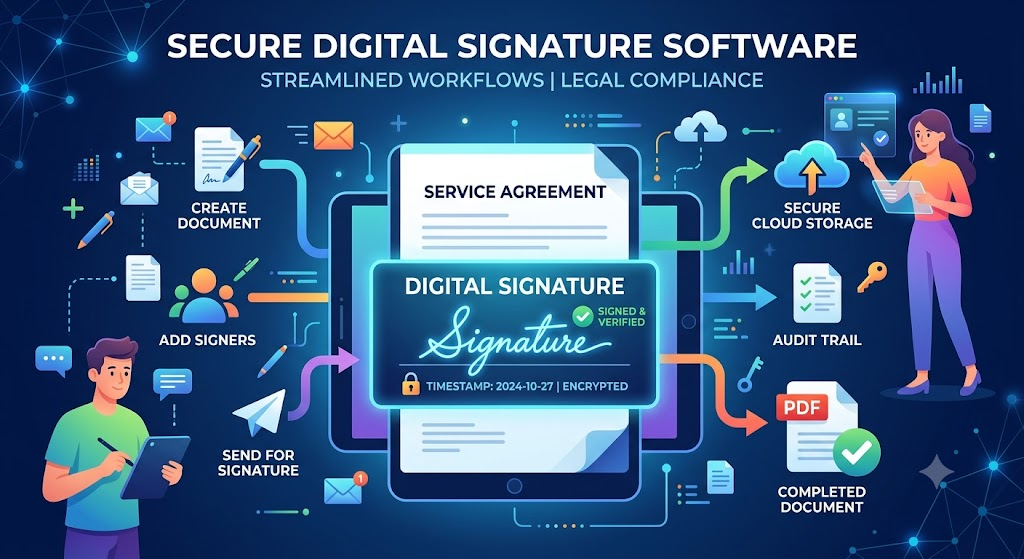
Good Digital Signature Software can help businesses manage suitable documents through an organised electronic process. It allows users to prepare documents, add signing fields, invite recipients, and keep track of the signing process through a digital platform.
However, not every organisation needs the same tools. A small business may only require basic document signing, while a company with several departments may need multiple signers, approval workflows, reminders, access controls, and recordkeeping options.
Before choosing a platform, it is important to understand how digital signing works, which features are useful, and what security considerations should not be ignored.
1. Understanding the Difference Between Digital and Traditional Signing
Traditional signing usually involves printing a document, writing a signature by hand, and returning the signed copy. Depending on the situation, users may also need to scan the document or send it through physical mail. This approach is familiar, but it can become inconvenient when several people are involved.
Electronic signing changes the way the document is completed. The sender prepares the file, identifies the recipients, and places the required fields. Recipients then open the document, review its contents, and complete the requested signing steps through the platform.
The term digital signature can also have a more specific technical meaning in some contexts. Certain digital signature methods use cryptographic technology to help verify the document's origin and detect changes. Electronic signatures, meanwhile, are a broader category of electronic methods used to indicate agreement or approval.
The terminology and legal definitions can differ between jurisdictions. Businesses should therefore understand what kind of signing method their chosen platform provides and whether it is suitable for the documents they handle.
A good starting point is to identify the purpose of each document. Routine internal approvals may have different requirements from financial contracts, property agreements, or documents that require formal identity verification.
2. Features That Make Document Signing Easier
The usefulness of a signing platform depends on how well its features support everyday tasks. A complicated system can create more work instead of reducing it, so businesses should focus on practical tools.
The first feature to check is document preparation. Users should be able to upload a supported file, add signature fields, and place other required information in the correct locations. The process should be easy enough for employees who do not work with document software every day.
Multiple signer support can be valuable when agreements require approval from several people. Some platforms may allow signers to complete their sections in a particular order, while others may support simultaneous signing. The right option depends on the organisation's workflow.
Reminders are another useful feature. A business may need to send an agreement to a customer and follow up when the document remains incomplete. Automated notifications can help reduce manual messages, where supported.
Document tracking can also make the process easier to manage. Teams should check whether they can see which documents are pending, completed, or awaiting another person's action.
Other useful features may include reusable templates, team permissions, completed document copies, and activity records. Before choosing a service, compare these options with actual business requirements.
3. How ESignature for Education Supports Academic Administration
Schools, colleges, and training institutions manage a wide range of forms. Admission documents, parent permissions, student declarations, staff agreements, and course-related paperwork may all require review or approval.
When every form is printed, signed, and returned physically, educational staff can spend significant time collecting paperwork. This becomes more difficult when parents or students are unable to visit the institution during office hours.
Using esignature for education can help institutions manage suitable forms electronically. For example, a school may share a permission form with parents before a school activity. Parents can review the information and complete the signing process through an approved platform.
Colleges can also consider electronic workflows for selected admission paperwork, internship agreements, internal staff approvals, and training records. This can be useful when students and employees are based in different locations.
Educational organisations should still protect student information. Access permissions should be set carefully, especially when documents contain personal details about minors. Institutions should confirm which forms can be signed electronically under their local rules and internal policies.
The signing platform should also be easy for parents, students, and staff to use. A simple process can improve document completion without forcing users to learn complicated software.
4. Electronic Signing for Financial and Business Agreements
Financial organisations regularly handle documents that require customer review and approval. These may include loan applications, insurance paperwork, account forms, service contracts, and investment-related agreements.
A paper-heavy process can make these activities inconvenient. Customers may need to print multiple pages, sign each required section, scan the documents, and return them to the institution. Missing details can lead to additional communication and repeated submissions.
An electronic signature financial services workflow can help organisations manage suitable paperwork digitally. Customers may receive a document, review the conditions, and complete the signing process through an approved platform. Staff can then manage the completed document according to their internal procedures.
However, financial paperwork requires careful attention. Users should review fees, repayment conditions, interest rates, cancellation terms, and other responsibilities before signing. Financial organisations must also consider identity checks, privacy obligations, audit records, and applicable regulations.
Similar processes are useful in property transactions. Businesses handling esign real estate documents may use electronic signing for eligible rental agreements, agency forms, and management paperwork. Each type of document should be checked separately because legal requirements can vary.
A platform should make signing easier without weakening the checks needed for important agreements.
5. Security, Verification, and Document Records
A signing platform may handle business contracts, customer information, employee records, and other private documents. This makes security an essential part of the selection process.
Start by checking how the platform controls document access. Businesses should be able to manage who can view, sign, or administer documents. Employee permissions should match their responsibilities rather than giving everyone access to every file.
Identity verification options are also worth reviewing. Depending on the document and applicable requirements, a business may need additional steps to confirm who is signing. The level of verification should match the risk associated with the transaction.
Encryption and secure storage are other important considerations. Ask the service provider how documents are protected while they are transferred and stored. Review the provider's data handling practices and understand where information is retained.
An audit trail can help maintain accountability by recording certain activities, such as when a document was sent, viewed, or signed. Businesses should check which events are recorded and whether the information can be retained for the required period.
Finally, review the legal acceptance of the signing method in the relevant location. Software features alone do not guarantee that every document will meet every legal requirement.
6. How to Select Software That Matches Your Business Needs
Choosing a signing platform becomes easier when an organisation understands its current problems. Start by listing the documents that require signatures and identifying how many people usually participate in each process.
A small company may only need a straightforward tool for customer agreements and employee forms. A larger organisation may require team management, multiple signing workflows, reusable templates, and integrations with existing business systems.
Ease of use should be tested before making a final decision. Employees should be able to prepare and send documents without repeated training. Recipients should also understand how to review and sign the paperwork.
Pricing needs attention as well. Check whether plans have monthly or annual limits, restrictions on the number of users, additional charges for certain features, or storage limitations. Businesses should understand the total cost rather than looking only at the advertised starting price.
Customer support is another practical consideration. When a document workflow stops working, timely assistance can help prevent delays. Review the support options and check whether they match your working hours and business needs.
A sensible approach is to compare two or three platforms using the same requirements. This makes it easier to understand which service offers the right balance of usability, security, functionality, and cost.
7. Common Mistakes to Avoid When Using Signing Software
Even a good platform can produce poor results when an organisation does not have a clear process. One common mistake is sending documents without checking them first. Incorrect names, dates, payment details, or missing clauses can create confusion after signing.
Another mistake is giving too many people access to sensitive files. Businesses should review user permissions regularly and remove access when employees or external representatives no longer need it.
Some organisations also choose software based only on price. A low-cost plan may not include important features such as multiple signers, activity records, or suitable security controls. The platform should be evaluated according to the documents being handled.
Finally, never assume that an electronic signature removes the need for legal review. Documents involving property, finance, employment, or regulated activities may have specific requirements. Businesses should confirm those requirements before changing their signing process.
Conclusion
Digital Signature Software can help organisations manage agreements and approvals without depending entirely on printed paperwork. It can support everyday business tasks, esignature for education, electronic signature financial services, and suitable property-related agreements involving esign real estate.
The right platform should offer a simple user experience, useful workflow features, appropriate security controls, and reliable document records. It should also match the organisation's size and the types of documents it handles.
Before making a decision, compare the available features and check the relevant legal requirements. A well-planned signing process can make document management more organised while helping employees and customers complete their responsibilities with greater convenience.










Comments (0)