

How Online PDF Editing Tools Improve Everyday Productivity

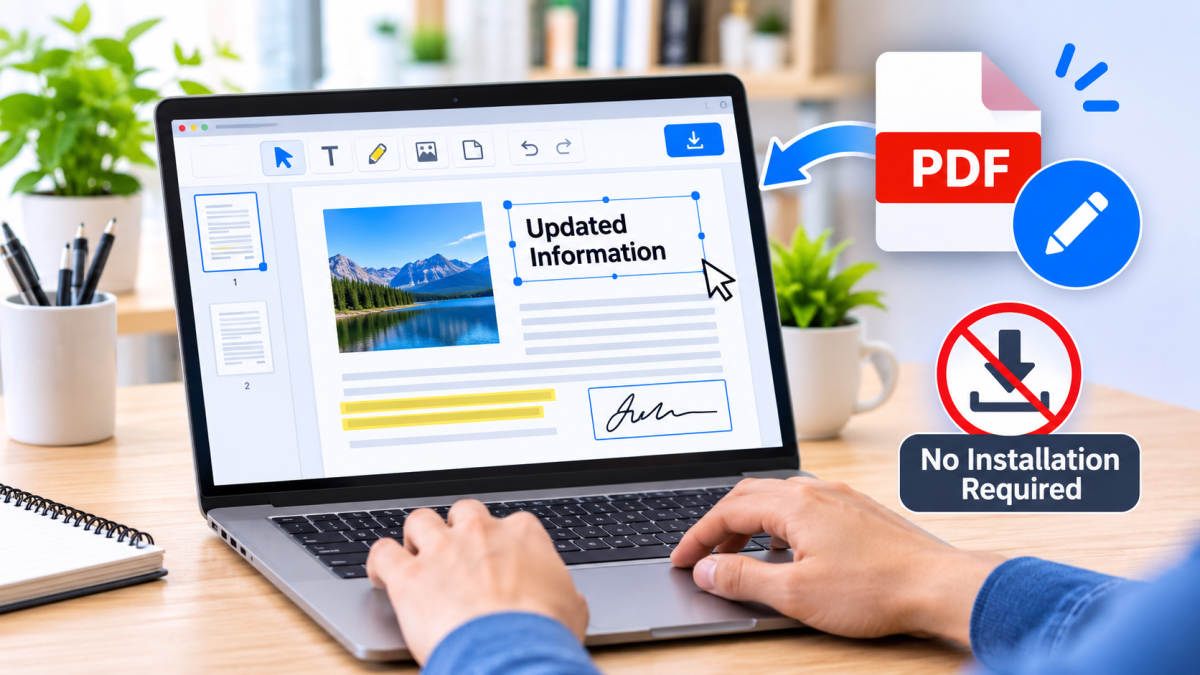
PDF documents are part of everyday life. Students use them for assignments and study materials, professionals rely on them for reports and presentations, and businesses exchange contracts, invoices, forms, and important records in PDF format. Although PDFs are convenient for sharing and preserving document layouts, making changes to them can sometimes become a time-consuming task.
In the past, editing a PDF often required expensive desktop software, technical knowledge, or converting the document into another format before making simple changes. Today, online PDF editing tools make the process much easier. Users can edit PDF documents directly through a web browser without installing complicated applications.
These tools do more than simplify document editing. They help people save time, reduce repetitive tasks, and improve document workflows. By making common PDF operations more accessible, online editors can support better productivity at work, school, and home.
1. Save Time on Everyday Document Editing
Time management is one of the biggest challenges in modern work environments. Even small document-related tasks can interrupt productivity when they require multiple applications or complicated processes.
Online PDF editing tools provide a more direct way to handle everyday changes. Instead of printing a document, correcting it manually, scanning it, and saving it again, users can make many adjustments digitally.
Depending on the editor's features, common tasks may include:
-
Adding or updating text in PDF documents.
-
Inserting images, shapes, and annotations.
-
Highlighting important information.
-
Adding comments and notes for review.
-
Removing unnecessary pages or content.
These capabilities reduce unnecessary steps and make document preparation more efficient. For example, an employee who needs to correct a business report can make the required changes digitally rather than recreating the entire document.
The time saved on individual tasks may seem small, but it can make a meaningful difference throughout a busy working day.
2. Improve Document Workflows with Browser-Based Tools
A productive workflow should make it easy to move from one task to another without unnecessary interruptions. Traditional document editing processes can become complicated when users need to switch between different programs to complete basic operations.
Online PDF editing tools help simplify these processes by bringing useful features into one accessible environment.
For example, someone preparing a project proposal might need to edit text, insert supporting images, combine several documents, and organize pages. Using separate applications for every step can create extra work. A suitable online PDF platform can make several of these tasks easier to manage.
Browser-based access also means users can work from different locations without depending on one particular computer. As long as they have a compatible device, a supported browser, and an internet connection, they can access their preferred tools.
A more organized process reduces friction, helps maintain consistency, and allows users to focus on the actual content instead of managing software.
3. Make Collaboration and Document Reviews Easier
Modern workplaces often involve multiple people reviewing the same document. A manager may need to check a report, a designer may provide feedback on a proposal, and a client may request changes before approving a final version.
Without an organized review process, feedback can become scattered across emails, messages, and separate document copies.
Online PDF editing tools can make reviews more manageable through features such as comments, annotations, highlighting, and text markup. Reviewers can identify specific sections that need attention instead of explaining every change through lengthy messages.
For example, a team preparing a marketing proposal can highlight an incorrect figure, add a comment beside a paragraph, and mark sections that require further discussion.
Some platforms also support sharing or collaborative workflows, although available features vary by provider. Users should check whether their chosen tool offers real-time collaboration, shared access, or simple file-based reviewing.
The result is a clearer feedback process and fewer misunderstandings during document preparation.
4. Reduce Software Costs and Technical Barriers
Not everyone needs a professional desktop application to make occasional PDF changes. Students, freelancers, small business owners, and individuals may only need basic editing features from time to time.
Online PDF editing tools offer a convenient alternative because many can be accessed without installing additional software. Some platforms also provide free features, allowing users to complete everyday document tasks without purchasing expensive subscriptions.
This accessibility is particularly useful for small businesses that want to control operating costs. Instead of purchasing separate applications for every employee, a business can explore browser-based solutions that provide the features its team actually needs.
Another advantage is ease of use. Many online editors have straightforward interfaces with familiar controls, making them accessible to people who do not have advanced technical skills.
However, users should always review feature limitations, file-size restrictions, pricing conditions, and privacy policies before choosing a platform.
5. Support Productivity Across Different Professions
Online PDF editing tools are useful in many industries because nearly every profession involves creating, reviewing, or sharing documents.
Here are some practical examples:
-
Students: Edit study notes, highlight important information, add comments, and organize assignments.
-
Teachers: Prepare learning materials, annotate worksheets, and update educational documents.
-
Freelancers: Edit client proposals, update invoices, and prepare professional documents.
-
Business teams: Review reports, update forms, and organize internal paperwork.
-
Remote workers: Make document changes without depending on a particular office computer.
-
Small business owners: Manage digital records, update business forms, and prepare documents for customers.
These examples demonstrate how PDF editing can support different working styles. Rather than treating document management as a separate responsibility, users can incorporate it into their normal daily routines.
6. Choose the Right PDF Editing Tool for Better Results
Not every PDF editor provides the same capabilities. Choosing the right platform is important if you want to improve productivity without introducing unnecessary complications.
Before selecting an online PDF editor, consider the following factors:
Essential editing features: Look for the ability to add text, insert images, annotate pages, and make common document adjustments.
Simple interface: A clean and understandable design helps users complete tasks without spending time learning complicated controls.
File security: Check how the platform handles uploaded documents, whether files are stored, and what happens after processing. Avoid assuming that every browser-based service processes files locally.
Compatibility: Choose a tool that works with your preferred browser and devices.
Useful additional features: Options such as merging, splitting, compressing, and converting PDFs can make document management more convenient.
For users looking for an accessible document solution, EasyConverterTool is worth exploring. It provides an online destination for document conversion and PDF-related tasks, helping users manage common file operations more conveniently.
The best tool is ultimately one that meets your requirements, protects your documents appropriately, and makes everyday work easier.
Conclusion
Productivity is not always about working longer hours. Often, it comes from removing unnecessary steps and making routine tasks easier to complete. Online PDF editing tools support this goal by simplifying document changes, organizing review processes, reducing software requirements, and making important features accessible through a browser.
Whether you are a student managing assignments, a freelancer preparing client documents, or a business professional handling daily reports, the ability to edit PDF documents efficiently can make a noticeable difference.
By choosing suitable online PDF editing tools and incorporating them into your regular routine, you can improve document workflows, spend less time on repetitive tasks, and focus more attention on meaningful work.







Comments (0)