What Factors Affect IPTV Picture and Sound Quality?
 parivariptv
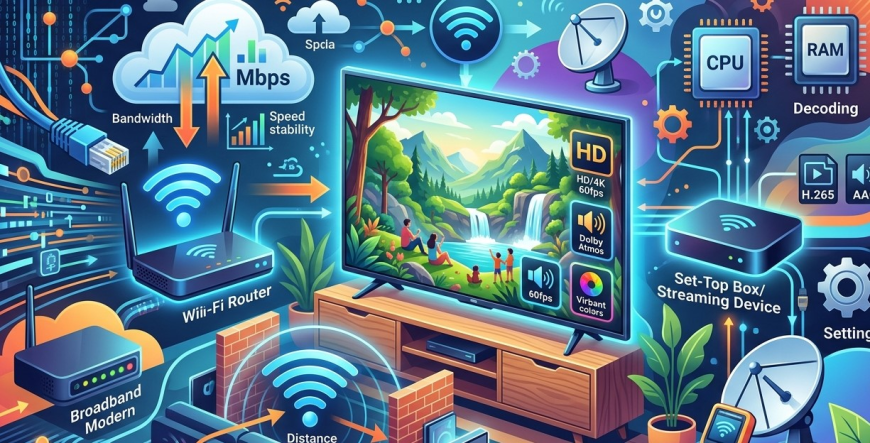
The quality of television has changed considerably as viewers have moved from traditional broadcasting toward internet-based entertainment. IPTV, or Internet Protocol Television, allows compatible television content to be delivered through an internet connection. With the right combination of service, network, device, and settings, IPTV can provide a clear picture and enjoyable sound experience.
However, IPTV quality is not determined by one factor alone. A fast internet connection is helpful, but it does not automatically guarantee perfect video and audio. Network stability, Wi-Fi performance, device capabilities, content quality, video compression, server performance, and even television settings can all influence the final viewing experience.
For viewers researching Parivar IPTV, understanding these factors can make it easier to identify the cause of poor playback and choose suitable equipment. An Indian IPTV Set Top Box can also provide a dedicated television setup, but its performance will still depend on the quality of the network and content being delivered.
This guide explains the major factors that affect IPTV picture and sound quality and provides practical ways to improve your overall viewing experience.
What Determines IPTV Quality?
When you watch IPTV, the content passes through several stages before reaching your television.
A simplified process looks like this:
Content Source → IPTV Provider → Internet Network → Home Router → IPTV Device → Television/Sound System
A problem at any stage can affect the final result.
For example, excellent television hardware cannot completely compensate for an unstable internet connection. Similarly, a very fast broadband connection cannot turn a low-quality video source into genuine 4K content.
Understanding the entire chain is therefore important when troubleshooting IPTV quality.
1. Internet Speed
Internet speed is one of the most obvious factors affecting IPTV performance.
Video streaming requires continuous data delivery. Higher-quality video generally requires more bandwidth.
Standard-definition video requires relatively little bandwidth, while HD and 4K streams can require considerably more.
As a general guide, an HD stream may require around 5–10 Mbps, while 4K streaming may require approximately 20–30 Mbps or more depending on the provider, compression, and content.
These numbers are not universal requirements.
If multiple people are streaming simultaneously, the household's total bandwidth requirement increases.
2. Internet Stability
Speed is important, but stability can be even more important.
Imagine having a fast internet plan but experiencing frequent interruptions, packet loss, or connection drops. IPTV may still buffer, freeze, or reduce video quality.
A stable connection allows data to reach the device continuously.
Signs of an unstable connection can include:
- Frequent buffering
- Sudden picture quality changes
- Frozen video
- Audio interruptions
- Temporary disconnections
- Delayed playback
If IPTV quality changes frequently even when your speed test looks good, network stability may be the issue.
3. Wi-Fi Signal Strength
Many IPTV users connect their television or set-top box through Wi-Fi.
While wireless networking is convenient, signal quality can vary significantly throughout a home.
Walls, floors, furniture, distance from the router, and interference from other wireless devices can affect performance.
If your router is located far away from the television, the connection may be weaker than expected.
For stationary equipment, such as an Indian IPTV Set Top Box, an Ethernet connection can often provide a more consistent connection when a wired setup is practical.
4. Ethernet vs. Wi-Fi
Ethernet provides a direct wired connection between your IPTV device and router.
This can reduce some of the variability associated with wireless connections.
Wi-Fi, on the other hand, provides greater convenience and works well in many homes when the signal is strong.
If you experience buffering, one useful troubleshooting step is to temporarily connect the IPTV device through Ethernet.
If the problem disappears, your Wi-Fi environment may be contributing to the issue.
5. Network Congestion
Your IPTV stream shares your home internet connection with other activities.
For example, someone in your household might be:
- Downloading large files
- Playing online games
- Using video conferencing
- Watching another streaming service
- Uploading files to cloud storage
- Installing software updates
These activities can consume bandwidth.
If several high-bandwidth activities happen simultaneously, IPTV playback may suffer.
Reducing unnecessary network activity during important viewing sessions can sometimes improve performance.
6. Router Performance
The router is an important part of an IPTV setup because it manages communication between your home devices and the internet.
An older or poorly configured router may struggle when many devices are connected simultaneously.
Modern households can have dozens of connected devices, including televisions, phones, computers, tablets, smart speakers, security systems, and appliances.
If your network contains many devices, upgrading to a modern router may improve overall network performance.
7. IPTV Provider Performance
Not every quality problem originates in your home.
The IPTV provider's infrastructure can also affect streaming performance.
If the provider experiences:
- Server overload
- Network congestion
- Technical problems
- Insufficient infrastructure
- Temporary outages
viewers may experience buffering or playback interruptions even with an excellent home internet connection.
One way to identify provider-side problems is to test multiple channels.
If many channels experience the same issue while other internet services work normally, the provider may need to investigate.
8. Video Source Quality
Another important factor is the quality of the original video source.
If a program was originally produced in low resolution, streaming it through a 4K television does not automatically make it true 4K.
Similarly, a low-quality source may appear soft or blurry even when your internet connection is fast.
The IPTV provider can only deliver the quality of the available source, subject to its encoding and distribution process.
This is why viewers should consider source quality rather than focusing only on advertised resolution.
9. Video Compression
Video compression reduces the amount of data required to transmit content.
Efficient compression can provide good picture quality while using less bandwidth.
However, excessive compression can create visible artifacts.
These may include:
- Blocky images
- Loss of fine detail
- Blurred movement
- Pixelation
- Reduced clarity
Two streams can both be advertised as "HD" while looking noticeably different because of differences in encoding and compression.
10. Resolution
Resolution refers to the number of pixels used to display an image.
Common television resolutions include:
- SD
- HD
- Full HD
- 4K UHD
Higher resolution generally provides more detail, especially on larger screens.
However, higher resolution also requires appropriate source quality, bandwidth, device support, and television hardware.
If an IPTV service provides HD content, watching it on a modern television can produce a sharp image. If genuine 4K content is available, a compatible 4K television and sufficient bandwidth can provide additional detail.
11. Television Quality
Your television itself has a major influence on picture quality.
Two televisions displaying the same IPTV stream can produce different results because of differences in:
- Panel technology
- Brightness
- Contrast
- Color reproduction
- Image processing
- Refresh rate
- Resolution
A high-quality IPTV stream can look significantly better on a modern television with good image processing.
However, television hardware cannot create missing detail from a low-quality source.
12. Picture Settings
Television settings can also change the viewing experience.
Many TVs include different picture modes, such as:
- Standard
- Cinema
- Movie
- Sports
- Dynamic
- Game
The ideal setting depends on the viewer and content.
If the picture looks overly bright, artificial, or excessively sharp, experimenting with the television's picture settings may help.
Users should avoid assuming that the most dramatic-looking preset automatically provides the most accurate image.
13. Audio Quality and Bitrate
Picture quality receives most of the attention, but sound is equally important.
IPTV audio quality can depend on the audio source, codec, bitrate, device, and sound system.
Higher-quality audio can provide clearer dialogue, better separation, and a more immersive experience.
However, the source must actually contain high-quality audio.
A high-end soundbar cannot recreate information that was not present in the original stream.
14. Television Speakers vs. Sound Systems
Built-in TV speakers are convenient, but they may not provide the same audio experience as a dedicated soundbar or home theater system.
If dialogue is difficult to hear or the sound feels weak, upgrading the audio equipment may improve the experience.
A compatible soundbar, AV receiver, or speaker system can provide:
- Clearer dialogue
- Wider sound
- Better bass
- More immersive effects
- Improved overall audio balance
The IPTV device and television must support the appropriate audio formats and connections.
15. IPTV Device Performance
The device receiving IPTV content also matters.
A modern Smart TV or dedicated IPTV device should have sufficient processing capability to decode the video smoothly.
An older or underpowered device may struggle with higher-resolution content.
Potential symptoms include:
- Stuttering
- Delayed responses
- Application crashes
- Slow channel switching
- Audio-video synchronization problems
An Indian IPTV Set Top Box with appropriate hardware specifications can provide a dedicated environment for compatible IPTV services.
Before purchasing a device, check its supported resolutions, operating system, connectivity options, and compatibility with your IPTV service.
16. Buffering and Playback Settings
Some IPTV applications provide playback settings that can affect performance.
For example, certain applications may allow users to adjust buffering behavior.
A larger buffer can sometimes help compensate for small fluctuations in network performance, although it may increase the delay between live broadcast and displayed video.
Other settings may control video quality or hardware/software decoding.
Users should follow the provider's recommendations before changing advanced settings.
17. Server Location and Network Routing
The physical location of IPTV infrastructure and the route used to deliver content can influence performance.
When data travels across multiple networks, congestion at different points can affect delivery.
For international viewers, the distance between their location and the provider's infrastructure can sometimes influence latency and stability.
This is another reason why two users with similar internet speeds can have different IPTV experiences.
How to Improve IPTV Picture Quality
If your IPTV picture does not look as good as expected, consider these steps:
Check Your Internet Speed
Make sure your connection meets the requirements for the video quality you are watching.
Improve Wi-Fi
Move the router closer to the television or improve wireless coverage.
Use Ethernet
Connect your Smart TV or Indian IPTV Set Top Box directly to the router when practical.
Reduce Network Traffic
Pause large downloads and unnecessary high-bandwidth activities.
Check Video Settings
Make sure the IPTV application and television are configured for an appropriate resolution.
Update Your Equipment
Keep your television, IPTV device, router, and applications updated where appropriate.
Test Multiple Channels
Determine whether the issue affects one channel or the entire service.
How to Improve IPTV Sound Quality
For better audio, you can:
- Check television volume and sound settings
- Use an appropriate audio mode
- Verify HDMI or optical connections
- Consider a soundbar
- Check whether the IPTV stream supports your preferred audio format
- Keep the television and IPTV device software updated
If sound and picture are not synchronized, restarting the application or device may help. Persistent synchronization problems should be reported to the provider or equipment manufacturer.
The Importance of a Balanced IPTV Setup
Good IPTV quality comes from multiple components working together.
You can think of the setup as five connected areas:
Quality Content + Reliable IPTV Provider + Stable Internet + Capable Device + Suitable TV/Sound System
If one component is significantly weaker than the others, it can become the limiting factor.
For example, a fast broadband connection will not improve a low-quality video source, while an excellent 4K television cannot compensate for severe network instability.
What Should You Check Before Choosing an IPTV Service?
If you are considering Parivar IPTV, evaluate more than the advertised channel count.
Check:
- Available channels
- Regional programming
- Video resolutions
- Audio quality
- Device compatibility
- EPG availability
- VOD features
- Simultaneous-stream limits
- Customer support
- Subscription conditions
- Content authorization
A service should match your household's actual requirements.
How Parivar IPTV Can Fit Into a Quality-Focused Setup
Viewers researching Parivar IPTV can consider how its available content and supported devices fit into their existing home network.
For Indian and regional entertainment, check the current channel lineup and supported languages.
If you prefer watching television on a large screen, an Indian IPTV Set Top Box may be useful if it is compatible with the chosen service.
The goal should be to build a complete setup where the internet connection, IPTV service, device, television, and audio system work together effectively.
Final Thoughts
IPTV picture and sound quality depend on much more than internet speed. Network stability, Wi-Fi strength, router performance, provider infrastructure, video source quality, compression, resolution, device capabilities, television settings, and audio equipment can all affect the final experience.
For viewers researching Parivar IPTV, understanding these factors can help identify the right equipment and network configuration for their needs. An Indian IPTV Set Top Box can provide a dedicated television experience, but it still requires a reliable connection and compatible IPTV service to perform effectively.
If your IPTV experience is not as clear or stable as expected, troubleshoot the system one component at a time. Check your internet connection, test Wi-Fi versus Ethernet, examine your device settings, try different channels, and determine whether the issue is limited to your home network or affects the IPTV service itself.
With a reliable provider, suitable equipment, stable internet, and properly configured television and audio settings, IPTV can deliver a high-quality and enjoyable home entertainment experience.