Aadhaar Biometric Lock and Unlock Process Explained for 2026
As Aadhaar continues to play a vital role in banking, government welfare schemes, telecom verification, and digital services, protecting your biometric information has become more important than ever.
 hazelwills
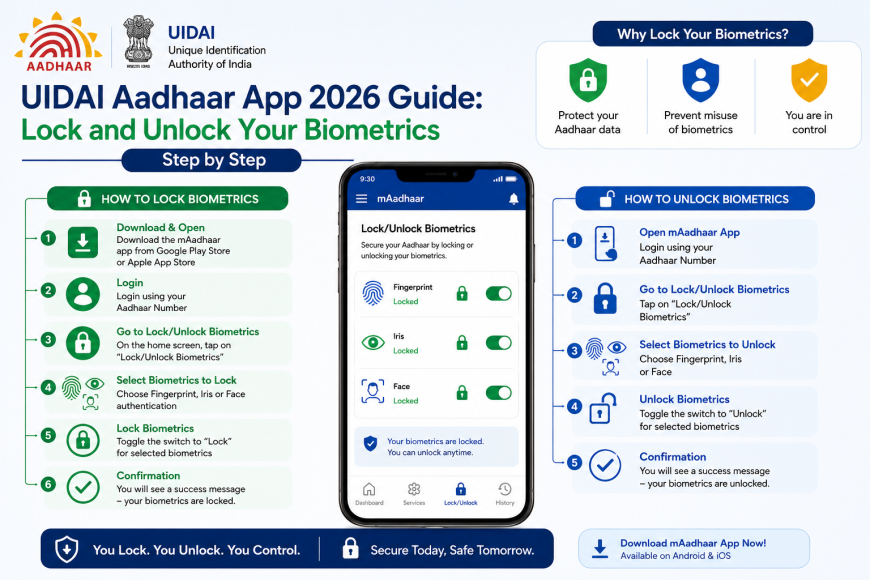
As Aadhaar continues to play a vital role in banking, government welfare schemes, telecom verification, and digital services, protecting your biometric information has become more important than ever. Every day, millions of Indians use Aadhaar authentication through fingerprints, iris scans, or facial recognition. While biometric authentication is secure, locking your biometrics when they are not in use adds an extra layer of protection against misuse.
To help Aadhaar holders safeguard their identity, the latest UIDAI Aadhaar app makes it easy to perform Aadhaar biometric lock unlock in just a few steps. Whether you need to lock your fingerprints for security or temporarily unlock them for authentication, the process is quick, free, and available online. UIDAI also supports biometric management through its official website and Aadhaar app.
In this guide, we'll explain everything you need to know about the Aadhaar biometric lock unlock process in 2026, including step-by-step instructions, benefits, and security tips.
What Is Aadhaar Biometric Lock?
Aadhaar biometric lock is a security feature provided by the Unique Identification Authority of India (UIDAI). It allows Aadhaar holders to disable the use of their biometric information—including fingerprints and iris scans—for authentication.
Once enabled, no one can use your biometrics for Aadhaar verification until you unlock them. If someone attempts biometric authentication while your biometrics are locked, the authentication request will fail automatically. This feature is intended to strengthen privacy and prevent unauthorised biometric use.
Why Should You Lock Your Aadhaar Biometrics?
Although Aadhaar authentication is highly secure, locking your biometrics offers additional protection.
Some major benefits include:
-
Prevents unauthorised fingerprint and iris authentication.
-
Protects against biometric fraud and identity misuse.
-
Gives you complete control over when your biometrics can be used.
-
Enhances the security of Aadhaar-linked banking and government services.
-
Provides peace of mind when your biometrics are not required.
If you rarely use biometric authentication, keeping your biometrics locked is considered a good security practice.
How to Lock Aadhaar Biometrics in 2026
The latest UIDAI Aadhaar app makes biometric locking simple and convenient.
Step 1: Download the Official UIDAI Aadhaar App
Install or update the official Aadhaar app from the Google Play Store or Apple App Store. The latest app allows users to manage Aadhaar services, including biometric lock/unlock, authentication history, and profile updates.
Step 2: Sign In Securely
Open the app and verify your identity using your registered mobile number and the OTP sent by UIDAI.
Step 3: Open Biometric Services
Navigate to the Biometric Lock/Unlock option available in the app.
Step 4: Verify Your Identity
Complete OTP verification to confirm that you're the Aadhaar holder.
Step 5: Enable Aadhaar Biometric Lock
Tap Lock Biometrics and confirm your request.
Your fingerprint and iris authentication will now remain disabled until you choose to unlock them.
How to Unlock Aadhaar Biometrics
Whenever biometric authentication is required, you can temporarily perform Aadhaar biometric unlock.
Follow these steps:
-
Open the UIDAI Aadhaar app.
-
Log in using OTP verification.
-
Select Biometric Lock/Unlock.
-
Tap Unlock Biometrics.
-
Complete OTP authentication.
-
Your biometrics become available for Aadhaar authentication.
According to UIDAI, biometric unlocking is temporary. After authentication, you can lock your biometrics again for maximum security.
Aadhaar Fingerprint Lock and Fingerprint Unlock
Fingerprint authentication is one of the most commonly used Aadhaar verification methods.
The Aadhaar fingerprint lock feature prevents anyone from using your fingerprints for authentication until you manually enable them.
If you need to complete biometric verification at a bank, Aadhaar Seva Kendra, or government office, simply perform an Aadhaar fingerprint unlock through the UIDAI Aadhaar app before authentication.
This ensures your fingerprint data stays protected whenever it is not actively being used.
Aadhaar Face Authentication
Along with fingerprints and iris authentication, UIDAI also supports Aadhaar face authentication for eligible services.
This technology uses facial recognition to verify your identity through your smartphone or an authorised authentication device.
Some benefits include:
-
Contactless verification.
-
Helpful when fingerprint authentication fails.
-
Faster authentication for supported services.
-
Improved accessibility for senior citizens and people with worn fingerprints.
-
Additional security alongside fingerprint and iris verification.
Face authentication complements—not replaces—other Aadhaar authentication methods.
Other Ways to Lock or Unlock Aadhaar Biometrics
Besides the UIDAI Aadhaar app, Aadhaar holders can also manage their biometrics through:
-
The official UIDAI MyAadhaar portal.
-
Aadhaar Seva Kendras (ASKs).
-
Selected enrolment centres.
UIDAI also provides SMS-based Aadhaar security services for certain lock and unlock functions linked to your registered mobile number.
Benefits of Aadhaar Biometric Lock Unlock
Using the Aadhaar biometric lock unlock feature offers several important advantages.
Enhanced Security
Locked biometrics cannot be used for authentication, reducing the chances of misuse.
Greater User Control
Only the Aadhaar holder decides when biometric authentication should be enabled.
Protection Against Fraud
Even if someone knows your Aadhaar number, they cannot authenticate using fingerprints or iris scans while your biometrics remain locked.
Quick and Convenient
The entire lock or unlock process takes only a few minutes using the official UIDAI Aadhaar app.
Free Service
UIDAI provides biometric lock and unlock services free of charge.
Tips to Keep Your Aadhaar Safe
While biometric locking significantly improves security, following a few best practices can provide even stronger protection.
-
Always use the official UIDAI Aadhaar app.
-
Never share your OTP with anyone.
-
Keep your registered mobile number active.
-
Check your Aadhaar authentication history regularly.
-
Lock your biometrics immediately after use.
-
Use Masked Aadhaar whenever full Aadhaar details are not required.
-
Report suspicious Aadhaar activity to UIDAI immediately.
These simple precautions can help prevent identity theft and unauthorised access.
Frequently Asked Questions
Is Aadhaar biometric lock free?
Yes. UIDAI provides the service completely free.
Can I unlock biometrics anytime?
Yes. You can perform Aadhaar biometric unlock whenever biometric authentication is required.
Does biometric lock affect OTP authentication?
No. OTP-based Aadhaar authentication continues to work normally.
Is Aadhaar fingerprint lock permanent?
No. You can unlock your fingerprints whenever required and lock them again after authentication.
Can I use Aadhaar face authentication while biometrics are locked?
Face authentication availability depends on the service provider and UIDAI authentication requirements. It is supported for eligible services through authorised platforms.
Final Thoughts
As Aadhaar becomes increasingly integrated into digital services, protecting your biometric information is essential. The UIDAI Aadhaar app makes the Aadhaar biometric lock unlock process simple, allowing users to secure their fingerprints and iris data whenever they are not needed.
Whether you want to enable Aadhaar biometric lock, perform Aadhaar biometric unlock, use Aadhaar fingerprint lock, complete an Aadhaar fingerprint unlock, or access services using Aadhaar face authentication, UIDAI provides secure and convenient tools to help you manage your digital identity.
Making biometric locking a regular habit is one of the easiest ways to strengthen your Aadhaar security and reduce the risk of identity misuse in 2026 and beyond.