Cloud-Based POS Software in Pakistan for Easy Management
Explore POS software in Pakistan for faster billing, inventory control, sales reports, customer management, and smoother daily business operations in one place.
 tahirchaudhary
POS Software in Pakistan: A Complete Business Guide
Running a business becomes difficult when sales, stock, payments, and customer records are managed by hand. In my experience, manual billing often causes mistakes, delays, and missing information. POS software in Pakistan helps businesses manage daily operations from one simple system.
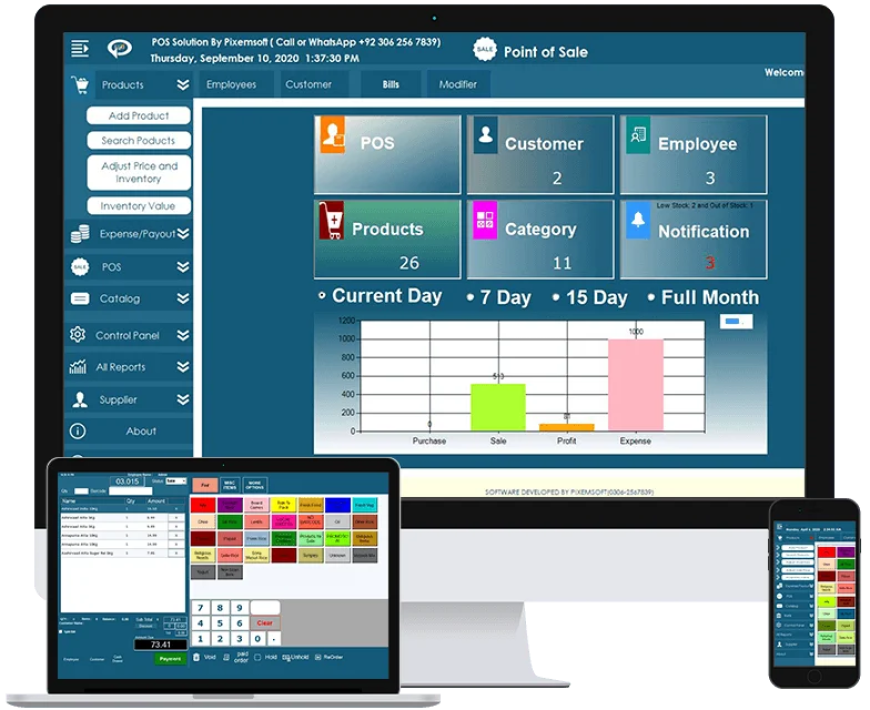
A modern POS system can handle billing, inventory, customer records, employee activity, and sales reports. It is useful for retail shops, restaurants, pharmacies, supermarkets, bakeries, salons, and many other businesses. By using the right system, I can save time, reduce errors, and understand business performance more clearly.
What Is POS Software?
POS stands for Point of Sale. It is a system used to complete customer transactions and record sales.
When a customer buys a product, the POS system calculates the total amount, applies discounts, accepts payment, and generates a receipt. At the same time, it can update stock levels and save the sale in the business reports.
POS software may work on a desktop computer, laptop, tablet, or mobile device. Some systems also connect with hardware such as:
-
Barcode scanners
-
Thermal receipt printers
-
Cash drawers
-
Customer displays
-
Weighing scales
-
Card machines
This combination helps businesses complete transactions quickly and professionally.
Why Businesses Need POS Software in Pakistan
Businesses in Pakistan are becoming more competitive. Customers now expect fast checkout, correct prices, easy payment options, and proper receipts.
When I manage sales through registers or spreadsheets, it becomes hard to track every transaction. POS software records each sale automatically and stores the information in one place.
It also helps prevent common problems such as incorrect billing, missing stock, duplicate entries, and calculation mistakes. Business owners can easily check how much they sold, which products are popular, and what items need to be reordered.
Main Features of POS Software in Pakistan
The features of a POS system depend on the business type and software provider. However, most systems include some important tools.
Fast Billing and Checkout
The billing feature allows employees to add products, calculate totals, apply taxes, and accept payments.
Products can be searched by name or scanned through a barcode reader. This makes checkout faster, especially during busy hours.
The system may also support cash, card, bank transfer, digital wallet, and split payment options.
Inventory Management
Inventory management is one of the most useful features of POS software in Pakistan.
Every time a product is sold, the system automatically reduces its quantity from the stock. I can check available stock, low-stock items, out-of-stock products, and damaged goods.
Low-stock alerts help businesses reorder products before they finish. This reduces the chances of losing sales because an item is unavailable.
Sales Reporting
POS software creates detailed reports about daily, weekly, monthly, and yearly sales.
These reports can show:
-
Total revenue
-
Number of transactions
-
Best-selling products
-
Slow-moving products
-
Profit margins
-
Payment methods
-
Employee sales
With these reports, I can understand the financial condition of the business and make better decisions.
Customer Management
A POS system can store customer names, phone numbers, email addresses, order history, and loyalty points.
This information helps businesses provide personalised service. For example, I can check what a customer purchased before and recommend related products.
Customer records can also be used for promotions, loyalty programmes, and discount offers.
Employee Management
POS software can create separate accounts for cashiers, managers, and other employees.
Each employee can receive limited access according to their role. The system may also record login times, completed sales, discounts, refunds, and cash drawer activity.
This feature improves accountability and helps management monitor staff performance.
Purchase and Supplier Management
Businesses regularly purchase stock from suppliers. A POS system can record supplier information, purchase orders, product costs, and pending payments.
I can compare supplier prices and check which vendor delivers products on time. This helps control purchasing costs and maintain better supplier relationships.
Benefits of Using POS Software in Pakistan
A good POS system can improve many parts of daily business operations.
Reduced Human Errors
Manual calculations can cause pricing, tax, and payment mistakes.
POS software calculates totals automatically. It also updates inventory and records transactions without requiring repeated data entry.
This improves accuracy and reduces the time spent fixing mistakes.
Faster Customer Service
Customers do not like waiting in long checkout lines.
With barcode scanning and automatic billing, employees can complete sales more quickly. Faster service improves customer satisfaction and allows the business to serve more people.
Better Stock Control
Without a proper inventory system, businesses may order too much or too little stock.
POS software shows the exact quantity of each product. I can identify popular products, slow-selling items, and products close to running out.
This helps reduce waste and improve cash flow.
Improved Business Decisions
POS reports provide real data about sales, expenses, customers, and inventory.
Instead of guessing, I can use these reports to decide which products to promote, when to order stock, and where to reduce costs.
Secure Business Records
Paper records can be lost, damaged, or changed easily.
POS software stores transaction details digitally. Cloud-based systems may also create automatic backups, which protect important information.
User permissions can prevent unauthorised employees from accessing sensitive reports or changing settings.
Types of POS Software in Pakistan
Different businesses need different types of POS systems.
Retail POS Software
Retail POS software is designed for clothing stores, grocery shops, electronics shops, cosmetics stores, and other retailers.
It usually includes barcode scanning, stock tracking, product variations, discounts, returns, and supplier management.
Restaurant POS Software
Restaurant POS software helps manage dine-in, takeaway, and delivery orders.
It may include:
-
Table management
-
Kitchen display systems
-
Menu management
-
Order modification
-
Split billing
-
Delivery tracking
-
Recipe inventory
This type of system helps restaurant staff send orders directly to the kitchen and reduce order mistakes.
Pharmacy POS Software
Pharmacy POS software can manage medicine stock, expiry dates, batches, prescriptions, suppliers, and sales.
Expiry alerts are especially important because they help pharmacies remove old products before they become unsafe to sell.
Salon and Service POS Software
Salons, clinics, gyms, and repair businesses may use service-based POS systems.
These systems can manage appointments, staff schedules, customer history, service packages, and payments.
Cloud-Based POS Software
Cloud POS software stores data online and can be accessed from different locations.
I can check reports from a mobile phone or laptop without being inside the shop. Cloud systems are useful for businesses with multiple branches.
Offline POS Software
Offline POS systems can continue working without a constant internet connection.
They may be suitable for areas where internet service is slow or unreliable. However, regular backups are important to protect data.
Related more articles, pos software pakistan
How to Choose the Right POS Software in Pakistan
Before selecting POS software, I first identify the needs of the business.
A small shop may only need billing and inventory features. A large restaurant may require table management, kitchen screens, online ordering, and delivery tracking.
I also check the following points:
-
Ease of use
-
Software price
-
Hardware compatibility
-
Customer support
-
Data backup
-
Security features
-
Number of users
-
Multi-branch support
-
Reports and analytics
-
Future upgrade options
The software should be simple enough for employees to learn without long training sessions.
Cost of POS Software in Pakistan
The price of POS software in Pakistan depends on its features, number of users, branches, and level of customisation.
Some providers charge a monthly or yearly subscription. Others offer a one-time licence with separate charges for updates and support.
Additional costs may include barcode scanners, receipt printers, cash drawers, computers, installation, and staff training.
I believe businesses should not choose a system only because it is cheap. A low-cost system may not provide reliable support, security, or important features.
Common Challenges During POS Setup
Installing POS software is only the first step. The business must also add products, prices, stock quantities, taxes, employees, and supplier details.
Employees may need training to understand billing, returns, discounts, and end-of-day reports.
Data should be checked carefully before the system goes live. Incorrect prices or stock quantities can create problems during sales.
It is also useful to test printers, scanners, payment methods, and backup settings before serving customers.
The Future of POS Software in Pakistan
The use of POS software in Pakistan is growing as more businesses move from manual systems to digital platforms.
Modern POS systems are now connecting with e-commerce websites, mobile apps, online payments, accounting software, and delivery platforms.
In the future, businesses may use artificial intelligence to predict customer demand, suggest products, detect unusual transactions, and automate stock ordering.
Mobile POS systems may also become more common because they allow businesses to accept payments from different locations.
Final Thoughts
POS software in Pakistan helps businesses manage billing, inventory, customers, employees, suppliers, payments, and reports from one place.
In my view, the right POS system can make daily work faster, more accurate, and more organised. It reduces manual effort and gives business owners a clear view of sales and stock.
Before choosing a system, I recommend checking the business requirements, software features, support quality, security, and future growth options. A reliable POS solution can improve customer service, control costs, and help a business grow with confidence.