Yealink A10‑010 Review: Features, Setup, and Advantages
Explore our detailed review of the Yealink A10‑010 video conferencing bar. See its key features, simple setup steps, and advantages for small spaces. Available now at your trusted online electronics shop.
 Skylerstark66
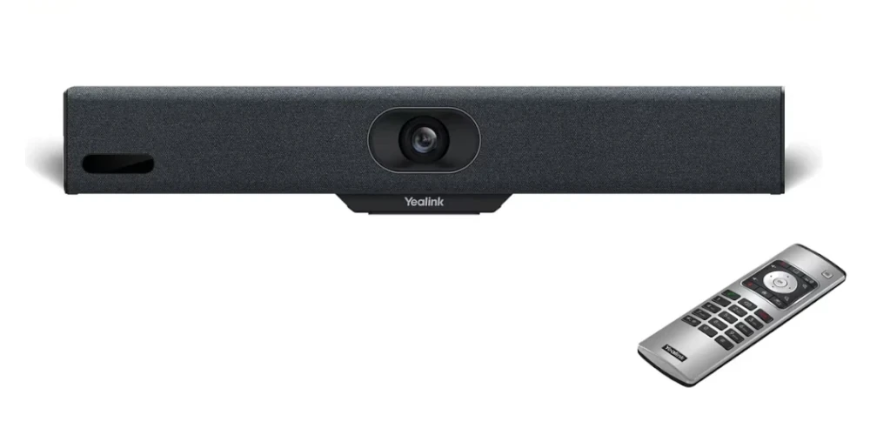
In a time when small meeting rooms and home offices are becoming the norm, choosing streamlined and effective video conferencing solutions is vital. The Yealink A10‑010 stands out as a compact all-in-one device designed to enhance collaboration without complexity. In this review, we’ll explore its key features, setup process, and real-world advantages. Plus, discover why purchasing through a reputable online electronics shop ensures you get genuine quality and support.
What Is the Yealink A10‑010?
The Yealink A10‑010 is part of Yealink’s MeetingBar series—a sleek video bar integrating a 4K camera, microphone, speaker, and computing unit in a compact horizontal form. Built for small rooms (roughly 2–6 people), this single-device solution delivers high-quality audio and video, and operates without needing a dedicated PC. Native support for Microsoft Teams and Zoom makes it ideal for hybrid work setups seeking hassle-free deployment.
Key Features of the Yealink A10‑010
1. 4K UHD Camera with AI Technology
Equipped with a 4K camera, the Yealink A10‑010 produces crisp, detailed visuals. AI-powered auto-framing and speaker tracking ensure participants remain centered, maintaining engagement during calls.
2. Integrated Audio System
Built-in dual loudspeakers and an 8-element microphone array provide full-duplex audio with noise suppression and beamforming—capturing speech cleanly and reducing background noise.
3. Compact and Stylish Design
The low-profile design mounts discreetly on displays or sits on desks, saving space while keeping aesthetics high. It’s a discreet yet powerful conferencing tool.
4. Native Conferencing Platform Support
With applications for Microsoft Teams and Zoom built-in, the Yealink A10‑010 eliminates the need for a PC, ensuring quick, seamless meeting experiences.
5. Simple Setup with PoE Support
Power over Ethernet lets you deploy the device with a single cable carrying power and data. This saves time, reduces clutter, and simplifies management.
6. Secure Management Tools
Yealink provides remote device management for firmware updates, diagnostics, usage reporting, and scheduling via cloud or on-premise solutions.
Setup Guide: Getting Started
Step 1: Unboxing and Placement
Inside the box: A10‑010 unit, HDMI and Ethernet cables, PoE injector/power adapter, mounting bracket, and quick-start guide. Mount it under or above a screen, or place it centrally on a table.
Step 2: Physical Connections
Connect the A10‑010 to your display via HDMI. Plug in the Ethernet cable (PoE-enabled switch recommended) or alternative power adapter. Connect your network.
Step 3: Initial Configuration
Power the device and follow the setup wizard to choose your conferencing platform—Teams or Zoom. Sign in using your organizational account to sync room information and credentials.
Step 4: Calibration & Testing
Run an audio and video test in the interface. Adjust camera placement and audio sensitivity as needed. Verify remote management visibility via device portal.
Step 5: Join or Schedule
Use the native interface to join instant meetings or schedule future ones. The intuitive UI ensures minimal steps to start a call.
Advantages & Real-World Benefits
A. Plug-and-Play Convenience
The Yealink A10‑010 starts fast and reliably—power it on, log in, and you’re ready to go. No external PC, cables, or configuration headaches.
B. High-Quality Communication
From university lectures to executive meetings, this device delivers professional-grade audio and video, reducing friction and increasing presence.
C. Cost-Efficient Small Room Deployment
Its all-in-one design costs significantly less than separate camera, mic, speaker, and mini-PC setups. Ideal for organizations deploying multiple small rooms.
D. Easy Remote Administration
IT teams can manage dozens of devices remotely—install updates, monitor status, and troubleshoot without entering each room.
E. Privacy & Security Controls
The device supports platform-level encryption (Zoom, Teams) with optional privacy shutter, protecting against unauthorized access.
Use Cases: Where the A10‑010 Excels
-
Home Office Professionals: Reliable, elegant, plug-and-play conferencing.
-
Huddle Rooms: Fast deployment for quick collaboration.
-
Consultation Rooms: Ideal for healthcare, legal, or advisory settings.
-
Training Booths: Enables localized instruction with clear audio and visuals.
-
Distributed Work Environments: Offices lacking complex AV infrastructure benefit greatly.
Why Buy from an Online Electronics Shop?
Buying the Yealink A10‑010 from a trusted online electronics shop offers:
-
Assurance of authentic product sourcing
-
Competitive bulk and corporate pricing
-
Professional pre-sale consultation
-
Fast, reliable shipping
-
Post-sales support and warranty fulfillment
With verified inventory and dedicated support, you secure both performance and peace of mind.
Final Thoughts
The Yealink A10‑010 delivers everything a small room needs: simplicity, reliability, and quality. Its compact design, all-in-one functionality, and native conferencing support make it a top choice for professional video collaboration in constrained spaces. With central management tools and enterprise-grade security, organizations can deploy this bar across multiple rooms with minimal effort and maximum ROI.
To experience the convenience and performance of the Yealink A10‑010, purchase it today from an online electronics shop that offers genuine products and expert support.
Frequently Asked Questions (FAQs)
Q1: Do I need a PC to run the Yealink A10‑010?
A: No. Native Microsoft Teams and Zoom support eliminates the need for an external computer.
Q2: How large should the room be?
A: The A10‑010 is designed for small meeting rooms accommodating around 2–6 participants.
Q3: Is the audio quality sufficient for noisy environments?
A: Yes. The beamforming mics and noise reduction technology perform well even in moderate background noise.
Q4: Can IT departments manage the device remotely?
A: Yes. Yealink’s device management platforms provide over-the-air updates, diagnostics, and control.
Q5: Where can I purchase a genuine Yealink A10‑010?
A: You can buy it from an authorized online electronics shop, ensuring authenticity and support.