Lenovo ThinkPad P16 Gen 3: Full 2026 Review
Is the Lenovo ThinkPad P16 worth buying in 2026? See specs, performance, battery life, and how it compares to the ThinkPad X1 Carbon Aura Edition.
 uaetechdubai
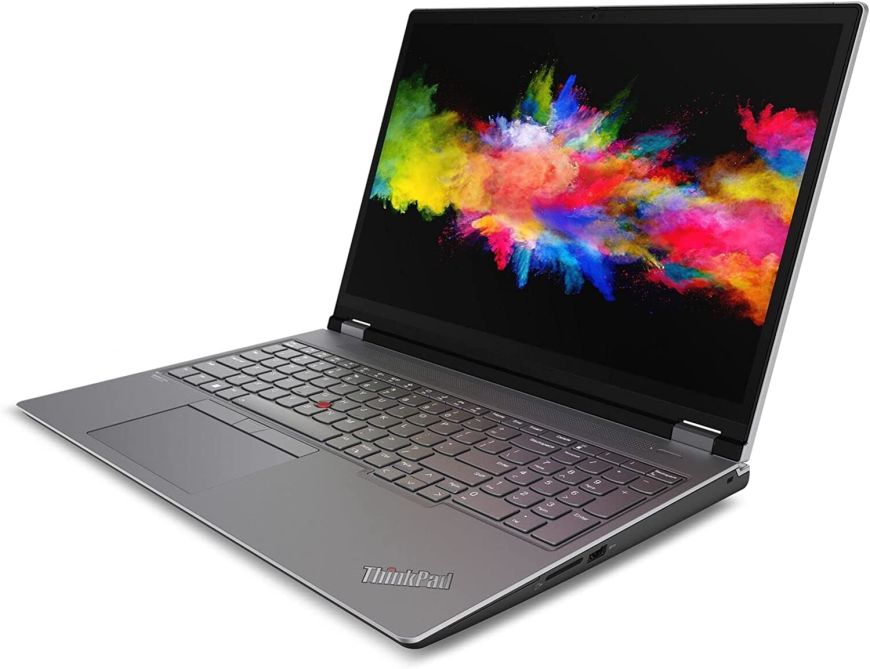
Lenovo ThinkPad P16: The Mobile Workstation That Redefines Portable Power
If you've ever tried to run heavy CAD software, edit 4K video, or train a local AI model on a laptop that felt like it was about to melt on your desk, you already understand why a proper mobile workstation matters. The Lenovo ThinkPad P16 was built precisely for that kind of demanding, no-compromise work and its latest generation has become one of the most talked-about machines in the professional laptop space.
In this guide, you'll learn exactly what the Lenovo P16 offers in 2026, how it performs in the real world, who it's actually built for, and how it stacks up against Lenovo's other flagship, the ultra-portable Lenovo ThinkPad X1 Carbon. By the end, you'll know whether this workstation deserves a spot on your desk or in your backpack.
What Is the Lenovo ThinkPad P16?
The ThinkPad P16 is Lenovo's flagship 16-inch mobile workstation, sitting at the top of the ThinkPad "P" series lineup that's designed for engineers, architects, video editors, data scientists, and other professionals who need workstation-class hardware in a laptop form factor. Unlike consumer laptops, the P16 is ISV-certified, meaning it's tested and validated to run professional software like AutoCAD, SolidWorks, Adobe Premiere Pro, and various machine learning frameworks without hiccups.
The newest generation brings a thinner, lighter chassis than its predecessors, a genuine step forward given that earlier P16 models were criticized for being bulky. Lenovo has clearly listened to reviewer feedback, and the results show in both weight and thermal performance.
Key Specifications at a Glance
Here's what the current-generation ThinkPad P16 brings to the table:
-
Processor: Intel Core Ultra HX-series chips, including the Core Ultra 9 285HX, offering up to 24 cores for serious multitasking and rendering workloads
-
Graphics: NVIDIA RTX PRO Blackwell-generation laptop GPUs, scaling from the RTX PRO 1000 up to the RTX PRO 5000 with 24GB of GDDR7 memory
-
Display: Up to a stunning OLED panel option, alongside IPS configurations reaching 3840 x 2400 resolution
-
Memory: Configurable up to 96GB, with user-upgradeable DIMM slots on many configurations
-
Storage: Fast PCIe 5.0 SSDs with dual M.2 slots on several builds for extra capacity
-
Connectivity: Thunderbolt 5 support delivering up to 80 Gbps (and up to 120 Gbps in bandwidth-boost mode), plus HDMI and multiple USB-C/USB-A ports
-
Battery: A large-capacity battery pack, with some testing showing multi-hour runtimes even under productivity workloads
This is not a laptop built for casual browsing it's a machine engineered to replace a desktop tower for professionals who can't afford downtime.
Real-World Performance: What Reviewers Are Saying
Independent testing paints a clear picture of where the ThinkPad P16 shines and where it makes trade-offs.
Storage and performance-focused reviewers have found that the P16 blends strong GPU performance with genuine workstation-class expandability, all while keeping the chassis reasonably portable for a 16-inch machine. In battery testing under typical office workloads, the laptop has managed roughly seven hours of runtime a notably better result than competing workstations from Dell and HP tested under the same conditions.
Hands-on, longer-term reviewers have also praised the improvements over the previous generation, describing the newer model as lighter, cooler-running, and equipped with better battery life than its predecessor, while retaining the excellent keyboard and display quality that ThinkPad users expect. USB-C charging support was also called out as a welcome addition that earlier P16 models lacked.
That said, it's not a universally perfect scorecard. Some outlets have noted that the laptop prioritizes portability over squeezing out every last drop of GPU performance, meaning it may not match bulkier, thicker workstations gram-for-gram in raw graphics throughput. If your priority is the absolute highest frame rate or render speed regardless of size and weight, a larger desktop-replacement workstation might still edge it out.
Case Study: Why Professionals Are Switching to the P16
Consider a freelance 3D architectural visualizer who previously relied on a desktop tower paired with a lightweight laptop for travel. Constantly transferring project files between two machines wasted hours every week and created version-control headaches.
After switching to a similarly configured ThinkPad P16 with a high-end RTX PRO GPU and 64GB of RAM, that same professional could render walkthroughs directly on client visits, make real-time revisions during meetings, and still get a workday's worth of battery life without needing to hunt for an outlet. This is the exact use case Lenovo designed the P16 for: eliminating the divide between "the machine I do real work on" and "the machine I carry around."
Similar stories are common among video editors working with RAW 4K footage on location, and machine learning practitioners who want to prototype and test models locally before scaling to the cloud all workloads where the P16's discrete NVIDIA graphics and ample RAM make a tangible difference.

Lenovo ThinkPad P16 vs. Lenovo ThinkPad X1 Carbon: Which One Do You Need?
It's easy to get these two flagships confused, since both carry the ThinkPad name and premium price tags. But they're built for entirely different jobs.
The Lenovo ThinkPad X1 Carbon now in its latest form as the Lenovo ThinkPad X1 Carbon Gen 14 Aura Edition is the company's ultra-lightweight business flagship. It weighs in at around 2.15 pounds, uses a magnesium-and-carbon-fiber chassis, and is built for executives and road warriors who prioritize portability, battery life, and a best-in-class typing experience over raw graphics horsepower. It runs on Intel's efficient Core Ultra "Panther Lake" processors with integrated Intel Arc graphics rather than a discrete GPU, and it introduces a redesigned internal "Space Frame" chassis that improves repairability while keeping the laptop remarkably thin and light.
The ThinkPad P16, by contrast, is built to be a portable desktop replacement. It's heavier, thicker, and pricier, but it delivers dedicated NVIDIA RTX PRO graphics and far higher sustained performance ceilings than the X1 Carbon could ever offer.
|
Feature |
Lenovo ThinkPad P16 |
Lenovo ThinkPad X1 Carbon (Gen 14 Aura Edition) |
|
Primary use case |
Workstation tasks: CAD, rendering, AI/ML |
Business productivity, travel, everyday computing |
|
Weight |
Roughly 5–6 lbs |
About 2.15 lbs |
|
Graphics |
Discrete NVIDIA RTX PRO (Blackwell) |
Integrated Intel Arc |
|
Display options |
Up to OLED, high resolution |
Up to 2.8K OLED |
|
Starting price |
Roughly $2,000+ |
Roughly $2,000+ |
|
Battery life |
Good, but secondary to power |
Excellent, a core selling point |
If your work involves 3D modeling, video rendering, or GPU-accelerated computing, the P16 is the clear choice. If you simply need the lightest, most refined laptop for meetings, email, and office work, the X1 Carbon is very likely the better fit.
Pros and Cons of the Lenovo ThinkPad P16
Pros:
-
Genuine workstation-class performance in a laptop that's more portable than most desktop-replacement machines
-
Excellent display options, including vibrant OLED panels
-
Legendary ThinkPad keyboard and build quality
-
Configurable, often user-upgradeable RAM and storage
-
Strong connectivity, including Thunderbolt 5
-
Noticeably improved battery life and thermals over previous generations
Cons:
-
Heavier and bulkier than ultraportables like the X1 Carbon
-
Premium pricing, especially on higher-end configurations
-
Peak GPU performance can trail bulkier, thicker competing workstations
-
Overkill for users who only need everyday productivity performance
Frequently Asked Questions
Is the Lenovo ThinkPad P16 good for gaming? It can run modern games reasonably well thanks to its NVIDIA discrete graphics, but it isn't marketed or optimized as a gaming laptop. Its strengths lie in professional workloads like 3D rendering and CAD rather than high-refresh-rate gaming.
How much does the Lenovo ThinkPad P16 cost? Pricing varies significantly by configuration. Entry-level configurations start in the low-to-mid $2,000 range, while fully loaded models with top-tier processors, maximum RAM, and the highest-end GPU can climb well beyond $4,000.
What's the difference between the ThinkPad P16 and the ThinkPad P16v? The P16v is a lighter, more budget-friendly variant within the same family, generally trading some performance ceiling and premium materials for a lower price and slightly reduced weight. The standard P16 sits above it as the more powerful, fully-featured option.
Can I upgrade the RAM and storage on the ThinkPad P16? Many configurations support user-upgradeable memory and offer dual M.2 SSD slots, making it easier to expand storage and memory over time compared to laptops with soldered components.
Is the Lenovo ThinkPad X1 Carbon a good alternative to the P16? Yes, but only if your priority is portability and battery life over raw computing power. The X1 Carbon Gen 14 Aura Edition is excellent for business travel and everyday productivity, but it can't match the P16's discrete graphics performance for demanding creative or technical workloads.
Final Thoughts: Should You Buy the Lenovo ThinkPad P16?
The Lenovo ThinkPad P16 has matured into one of the most compelling mobile workstations on the market. It successfully balances genuine desktop-class performance with a chassis that's finally light enough to actually carry around, backed by a keyboard and build quality that remain the gold standard in business computing. It isn't for everyone casual users and road warriors will likely be happier and lighter with something like the ThinkPad X1 Carbon but for engineers, creators, and technical professionals who need serious horsepower on the go, the P16 is hard to beat.
If you're deciding between the ThinkPad P16 and the X1 Carbon, think honestly about your daily workload: do you need raw graphics and processing power, or do you need the lightest possible machine for meetings and travel? Either way, Lenovo has built a ThinkPad for the job.
Have you used the Lenovo ThinkPad P16, or are you considering one for your next upgrade? Share your experience in the comments below, and pass this guide along to a colleague who's weighing their next workstation purchase.