Effective Methods on How to Retrieve Deleted Emails from Yahoo
Take a look at the sections below to learn about how to retrieve deleted emails from Yahoo.
 raymondjones7273
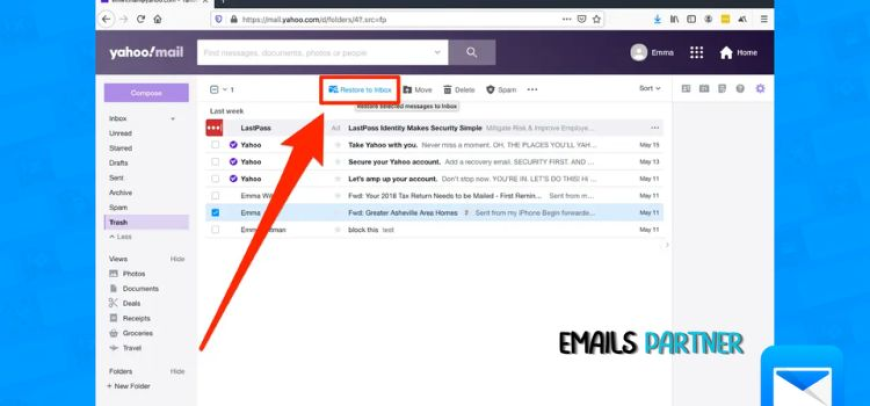
Have you ever felt panicked after accidentally deleting an essential email? If so, you may be asking how to recover deleted emails from Yahoo and if it is really possible. After making such mistakes, many users feel helpless, believing their messages are irretrievable. Yahoo Mail offers a recovery process that can restore your deleted emails, provided certain conditions are satisfied.
Accidentally deleting emails can be disastrous, especially if they contain important professional documents, personal attachments, or time-sensitive information. The initial reaction is usually frustration, but understanding Yahoo's recovery process can provide much-needed respite. Unlike some email providers, Yahoo Mail includes a few built-in safety nets that temporarily save deleted emails, allowing you the option to restore them. However, recovering them is contingent on how promptly you act and whether they remain within Yahoo's retention term.
This guide aims to outline various scenarios where you can restore your emails, along with the practical steps you should follow. Take a look at the sections below to learn about how to retrieve deleted emails from Yahoo.
Yahoo Email Recovery Guide: Criteria for Recovering Deleted Messages
Have you accidentally deleted an essential email and are concerned it is gone forever? Do not panic just yet. Yahoo Mail offers several recovery solutions, but they only function if you meet certain requirements. Are you curious whether your scenario qualifies for recovery? Let's look at the most important conditions to comprehend before beginning the process.
- Check the Trash Folder First: When you delete an email, Yahoo does not remove it immediately. Instead, it is moved to the Trash folder, where it remains temporarily. If the email is still present, you can quickly restore it to your inbox with a single click.
- Trash Retention Time Limit: Deleted emails will remain in the Trash bin for up to 7 days. If you haven't emptied the folder or exceeded this time limit, recovery is simple. After 7 days, the emails may be permanently lost.
- Deleted Permanently but Within 7 Days: If you unintentionally empty your Trash but notice your error within 7 days, Yahoo's Restore Request tool can help. This option allows Yahoo to attempt to restore emails from its backup servers.
- Emails Lost Due to Technical Issues: Emails can disappear due to syncing issues, app problems, or hijacked accounts. Yahoo's support system allows you to request a recovery in such instances, as long as the occurrence occurred lately.
- Eligibility for Restore Request: The Restore Request option is only applicable if the deletion or loss occurred during the last 7 days. Yahoo cannot retrieve emails beyond that deadline, regardless of the cause.
Different Methods for Recovering Deleted Yahoo Emails
Losing a crucial email can be upsetting, but Yahoo Mail offers a variety of recovery methods based on when and how it was deleted. The following are the most efficient strategies outlined in detail:
Method 1: Recover from the Trash Folder
Sometimes emails that you believed were lost are merely languishing in your trash folder. Yahoo Mail temporarily keeps deleted emails here, allowing you to recover them. If you act promptly, recovery is straightforward.
- First, deleted emails are stored in the Trash for up to 7 days.
- To restore, open the Trash folder and select the email.
- Finally, move it back to your Inbox or any custom folder.
Method 2: Use Yahoo's Restore Request
If you've already emptied your trash or the emails are missing, Yahoo's Restore Request tool can assist. This is one of the most efficient recovery strategies when time is on your side and the deletion was recent.
- If you permanently erased emails (including those in the Trash), Yahoo has a Restore Request option.
- This application allows Yahoo to attempt to recover lost emails from backup servers.
- It only works if the deletion occurred within the last seven days. Thereafter, recovery is impossible.
- You'll need to make a request via Yahoo's official help page.
Method 3: Check Other Devices and Email Clients
Many Yahoo Mail users sync their accounts with third-party apps or devices. In such circumstances, deleted emails may still remain outside of Yahoo's webmail platform, providing an additional recovery chance.
- Check out Outlook, Thunderbird, Apple Mail, or mobile apps.
- Check local folders such as Sent, Archive, and Inbox.
- Emails are sometimes retained locally after being deleted from Yahoo.
Method 4: Look in Archived or Filtered Folders
Some "lost" emails are just hidden in other files due to filtering or archiving, rather than being removed completely. This strategy allows you to find emails that were never erased in the first place.
- Use the Search field to find keywords, sender names, or subjects.
- Check the Archive folder or any custom folders you've made.
- Examine filter settings that may have resulted in diverted emails.
Method 5: Contact Yahoo Experts
If none of the above procedures work and the email is critical, calling Yahoo Support may be your last option. They may advise you on additional troubleshooting or determine whether recovery is still possible.
Common Mistakes Users Make During Recovery Attempts
When users realize they've erased crucial emails, the rush to recover them can result in blunders that lower their odds of succeeding. Understanding these typical blunders will help you avoid setbacks and make the most of your rehabilitation efforts.
1. Delaying Recovery Actions
Yahoo only stores deleted emails in Trash for seven days. Waiting too long before checking or sending a restore request can result in irreparable loss.
2. Overlooking Filters & Archives
Many users overlook the fact that filters can automatically forward emails or store them in the Archive folder. Failure to do a comprehensive search before attempting advanced recovery can waste critical time.
3. Submitting Multiple Restoration Requests
Yahoo only accepts one restore request at a time. Repeated submissions can impede or even stop the recuperation process, lowering your chances of success.
4. Relying on Support Beyond the Limits
Yahoo cannot recover emails deleted more than 7 days ago. Believing that customer assistance can get around this barrier just leads to frustration and lost effort.
Also Read: How to Manage Multiple Outlook Accounts Like a Pro
Tips to Prevent Future Email Losses in Yahoo
Losing essential emails is stressful; thus, prevention is always preferable to recovery. By following a few wise habits, you may limit the danger of inadvertent deletions and keep your messages safe. Yahoo offers various solutions that, when used appropriately, can help preserve your sensitive information in the long run.
- Backup Emails on a Regular Basis: POP/IMAP allows you to sync Yahoo Mail with third-party programs such as Outlook or Thunderbird. This creates local copies of your emails, guaranteeing their accessibility even in the event of a compromised Yahoo account.
- Use the Archive feature: Rather than discarding emails, archive them. Archived emails are removed from the inbox but are safely stored, providing clutter-free organization without the fear of irreversible deletion.
- Be Careful with the Trash Folder: Yahoo automatically deletes Trash after 7 days. Before clicking "Empty Trash," ensure that no critical emails are present.
- Enable Strong Security Measures: Protect your account from hacking, which can cause email loss. Use two-factor authentication, change your password frequently, and avoid using the same password for several accounts.
- Organize Using Folders and Filters: Create separate folders for work, personal, and promotions. This decreases inbox turmoil and lowers the likelihood of mistakenly removing critical messages during bulk cleanups.
Conclusion!
When you understand your alternatives, recovering deleted emails does not have to be difficult. You may often easily restore important messages by acting promptly and experimenting with various recovery methods. From scanning the Trash folder to using Yahoo's Restore Request, each step improves your odds of success. Remember that Yahoo only retains deleted emails for a short time. Whether for professional or personal usage, understanding how to recover deleted emails from Yahoo keeps you prepared. Manage your account intelligently and stay organized, and you'll always have a better email experience going ahead.