How Remote Teams Can Reduce Everyday Email Friction
Learn how remote teams can improve email drafting, account testing, privacy, and professional communication without adding another complicated platform.
 ethan
ethan
Remote teams depend heavily on written communication.
Without regular face-to-face conversations, people use email to confirm decisions, request files, follow up on projects, introduce new partners, answer customers, and document important information.
The problem is not always the number of emails.
A large amount of time is lost in the smaller tasks surrounding each message:
-
Deciding how to begin
-
Choosing the right tone
-
Rewriting unclear sentences
-
Testing account notifications
-
Receiving temporary verification emails
-
Maintaining a professional signature
-
Checking whether the recipient knows what to do next
These tasks may take only a few minutes individually, but they are repeated across the entire team.
A more efficient workflow should improve three stages of email communication:
-
Draft the message clearly.
-
Separate temporary activity from important communication.
-
Present a consistent professional identity.
Begin With the Desired Outcome
The fastest way to write an email is not to start with the greeting.
Start by defining what should happen after the recipient reads the message.
For example:
-
Approve the latest design
-
Send a missing document
-
Confirm a meeting time
-
Answer a customer question
-
Review a proposal
-
Pay an outstanding invoice
-
Provide feedback before a deadline
Once the outcome is clear, the rest of the message becomes easier to structure.
A useful email normally includes:
-
A subject line that identifies the topic
-
Enough context to understand the situation
-
One clear request or update
-
A realistic next step
-
A tone that fits the relationship
Remote teams should avoid hiding several unrelated requests inside one long message. When possible, each important email should focus on one primary outcome.
Use AI to Create the First Structured Draft
Many professionals know exactly what they need to communicate but still spend too much time arranging the sentences.
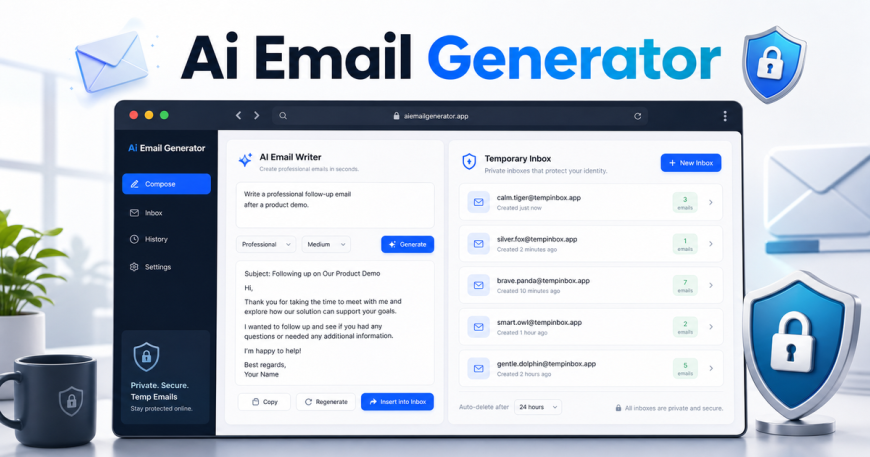
An AI email generator can help turn a short description into a suggested subject line and editable email draft.
The quality of the result depends on the quality of the context.
Instead of entering:
Write a project follow-up.
Provide details such as:
Write a concise and friendly follow-up to a designer who was expected to deliver the homepage files yesterday. Ask whether there is a new delivery time and whether any additional information is needed from our team.
The second request includes:
-
The recipient
-
The project
-
The previous expectation
-
The current question
-
The preferred tone
-
The desired next action
This produces a more useful starting point.
Information Worth Including
Before generating an email, identify:
Recipient: Who will receive the message?
Purpose: Why is the email being sent?
Context: What has already happened?
Tone: Should the message be formal, friendly, concise, persuasive, or apologetic?
Action: What should the recipient do next?
Timing: Is there a deadline or preferred response date?
A structured tool can collect these details without requiring every user to understand advanced prompt writing.
Review Every Generated Message
AI-generated email should always remain editable.
Before sending, check:
-
Names and job titles
-
Dates and time zones
-
Prices and payment details
-
Deadlines
-
File names
-
Links and attachments
-
Promises or commitments
-
Confidential information
Remote teams work across locations, languages, and time zones. A generated draft may sound correct while still containing a practical mistake.
The AI should reduce writing effort, but the sender remains responsible for accuracy.
Make Remote Emails Easier to Act On
A well-written email is not only polite. It is actionable.
The recipient should immediately understand:
-
Why the message matters
-
What information is relevant
-
What action is expected
-
When the action should happen
Consider the difference between these endings:
Please let me know what you think.
And:
Please review the attached homepage draft and send your approval or requested changes by Thursday at 3 p.m. Eastern Time.
The second version reduces uncertainty.
For distributed teams, always include the time zone when mentioning a specific time. Expressions such as “tomorrow morning” can mean different things to people in different countries.
Separate Testing From Important Communication
Remote teams often use many online tools.
Project platforms, video meeting services, customer portals, newsletters, development environments, and software trials may all require email verification.
Using a primary work address for every temporary signup can create unnecessary inbox clutter. It can also mix product testing messages with client communication.
For short-term and low-risk tasks, a temporary email inbox can provide a separate address for receiving verification codes, confirmation links, and test messages.
This can be useful when a team member needs to:
-
Test a website registration process
-
Check whether an automated message arrives
-
Create a temporary demonstration account
-
Verify a low-priority online service
-
Test newsletter confirmation
-
Review the formatting of a transactional email
A Simple Testing Process
A basic workflow may look like this:
-
Generate a temporary address.
-
Enter it into the registration or test form.
-
Open the temporary inbox.
-
Confirm that the message arrives.
-
Test the verification code or link.
-
Record any delivery or formatting issue.
-
Finish the test without creating another permanent inbox.
When reviewing the message, check more than delivery.
Ask:
-
Is the sender name recognizable?
-
Is the subject line clear?
-
Is the verification code easy to find?
-
Does the main link work?
-
Is the email readable on mobile?
-
Does the message explain what happens next?
Know When a Temporary Inbox Is Inappropriate
Temporary email should not be used for:
-
Banking
-
Payment services
-
Important customer accounts
-
Cloud storage
-
Long-term subscriptions
-
Internal company systems
-
Password recovery
-
Accounts containing valuable information
The decision rule is simple:
When future access matters, use a permanent address controlled by the team.
Temporary inboxes are appropriate for testing and short-lived verification, not for important digital identities.
Create a Consistent Team Signature
Remote teams may communicate with customers without ever meeting them in person.
That makes small identity details more important.
A professional signature can help the recipient understand:
-
Who sent the message
-
What role the sender has
-
Which organization they represent
-
How to contact them
-
Where to find official information
A practical signature may include:
-
Full name
-
Job title
-
Company
-
Website
-
Phone number
-
One relevant professional profile
An email signature generator can help team members create a structured signature without manually editing HTML.
Avoid Overloading the Signature
A signature should support the message rather than compete with it.
Avoid adding:
-
Several promotional banners
-
Large animated images
-
Long quotations
-
Too many social icons
-
Multiple phone numbers
-
Unnecessary legal text
-
Outdated scheduling links
Large signatures create visual clutter and may display poorly on mobile devices.
For most remote teams, a simple shared standard is more effective than a highly decorative design.
Review Team Signatures Regularly
Signatures often become outdated because they are created once and forgotten.
A team should periodically check:
-
Job titles
-
Phone numbers
-
Website links
-
Calendar links
-
Company names
-
Social profiles
-
Logos
-
Legal disclaimers
A former job title or broken website link can appear in hundreds of outgoing messages before anyone notices.
A short quarterly review can prevent this.
Build a One-Minute Email Checklist
Before sending an important remote-work email, check the following.
Purpose
Is the main purpose obvious?
Action
Does the recipient know what to do next?
Timing
Are the date, deadline, and time zone clear?
Accuracy
Are names, links, prices, and attachments correct?
Tone
Does the wording fit the recipient and situation?
Privacy
Does the email include information the recipient does not need?
Identity
Is the sender’s signature accurate and consistent?
This review takes less time than correcting a confusing email later.
Do Not Automate the Relationship
Automation can reduce repetitive work, but it should not remove judgment.
A customer complaint may require empathy that a generic template cannot provide. A payment discussion may involve commitments that need direct approval. A sensitive internal issue should not be handled like a routine follow-up.
The level of automation should match the risk.
Low-risk communication
-
Routine meeting confirmations
-
Simple follow-ups
-
Basic status updates
-
Subject-line suggestions
Medium-risk communication
-
Customer support
-
Sales outreach
-
Payment reminders
-
Hiring communication
High-risk communication
-
Legal issues
-
Contract changes
-
Security incidents
-
Financial commitments
-
Confidential disputes
AI can help organize high-risk messages, but a qualified person should control the final wording and decision.
Final Thoughts
Remote teams do not necessarily need another large communication platform.
They often need better handling of the small tasks around the tools they already use.
A clearer email workflow can begin with three improvements:
-
Use structured drafts instead of staring at a blank page.
-
Keep temporary verification and testing separate from important communication.
-
Maintain a consistent and accurate professional signature.
These changes help teams write faster, test more safely, and make every message easier to understand.
The goal is not to automate every conversation. It is to reduce repetitive effort while keeping people responsible for facts, tone, privacy, and the final message.