How to Track Software Usage on Employee Computers
Learn how to track software usage on employee computers, improve productivity, monitor application usage, and optimize workflows with WorkDesQ.
 WorkDesQ
Many businesses provide employees with company computers to complete daily tasks. But as teams grow, it becomes difficult to know which software is helping employees work efficiently and which applications are wasting time.
Tracking software usage on employee computers helps managers understand how work is getting done. It also helps improve productivity, identify training needs, and ensure that company resources are being used for work-related tasks.
The goal is not to watch every click employees make. Instead, it is to collect useful information that helps teams work better and make informed business decisions.
What Is Software Usage Tracking?
Software usage tracking is the process of recording which applications employees use during working hours, how long they use them, and how often they switch between programs.
For example, a marketing employee may spend most of the day using design software, spreadsheets, and web browsers. A customer support agent may work mainly in a help desk application and communication tools. By reviewing software usage, managers can confirm that employees have the right tools and understand how work is being completed.
Benefits of Tracking Software Usage
Tracking application usage offers several advantages for both businesses and employees.
Improve Productivity
Managers can identify which applications support productive work and which ones consume unnecessary time. This helps employees stay focused without constant supervision.
Identify Workflow Problems
If employees spend too much time switching between multiple applications, it may indicate an inefficient process. Businesses can simplify workflows after reviewing software usage reports.
Better Software Planning
Many companies pay for software licenses that are rarely used. Usage reports help businesses identify unused applications and reduce unnecessary software costs.
Support Employee Training
If employees avoid certain business applications or struggle to use them effectively, managers can provide additional training instead of assuming poor performance.
Improve Resource Allocation
Software usage reports help managers understand how different teams work. This information makes it easier to assign projects, plan workloads, and improve team efficiency.
What Should You Track?
A good software usage tracking solution should provide useful information without creating unnecessary complexity.
Important data includes:
- Applications used during working hours
- Total time spent in each application
- Frequently used software
- Active and idle time
- Login and logout times
- Daily productivity summaries
- Trends across teams and departments
This information provides a clear picture of how work is completed throughout the day.
Best Practices for Tracking Software Usage
Be Transparent
Always let employees know that software usage is being tracked. Explain why the data is collected and how it benefits both employees and the company.
Track Business Devices Only
Monitoring should be limited to company-owned computers used for work. Respect employee privacy and avoid tracking personal devices unless there is a clear business policy.
Focus on Improvement
Use reports to improve workflows, identify support needs, and recognize productive work instead of looking for reasons to penalize employees.
Review Reports Regularly
Software usage reports are most valuable when reviewed consistently. Weekly or monthly reviews help identify trends that may not be visible from daily activity.
Common Challenges
Some organizations start tracking software usage but fail to use the information effectively.
Common challenges include:
- Collecting too much data without analyzing it
- Judging productivity based only on application usage
- Ignoring different work styles across departments
- Failing to communicate monitoring policies with employees
A balanced approach creates trust while providing meaningful insights.
How WorkDesQ Helps
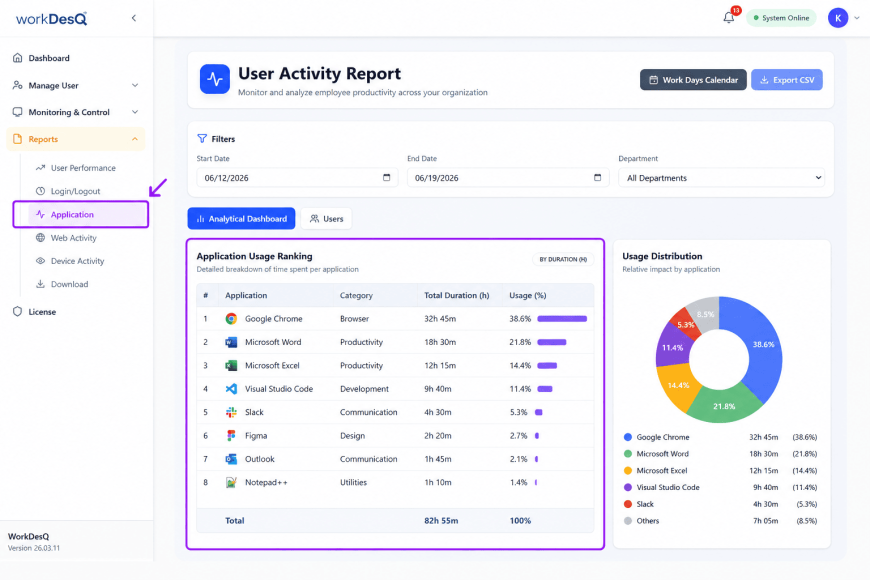
WorkDesQ helps businesses track software usage on employee computers through a single dashboard. Managers can view application usage, active working hours, idle time, attendance, and productivity reports without manually collecting data from different systems.
Instead of relying on assumptions, teams receive clear reports that help improve workflows, manage workloads, and make better business decisions. The platform is suitable for office, remote, and hybrid teams that need reliable visibility into daily work activities.
Conclusion
Tracking software usage on employee computers is about understanding how work happens, not about micromanaging employees. When businesses use the information responsibly, they can improve productivity, reduce software costs, simplify workflows, and provide better support to their teams.
Choosing a solution that offers accurate reports, easy-to-read dashboards, and clear productivity insights makes it easier for managers and HR teams to make informed decisions while creating a more efficient workplace.